
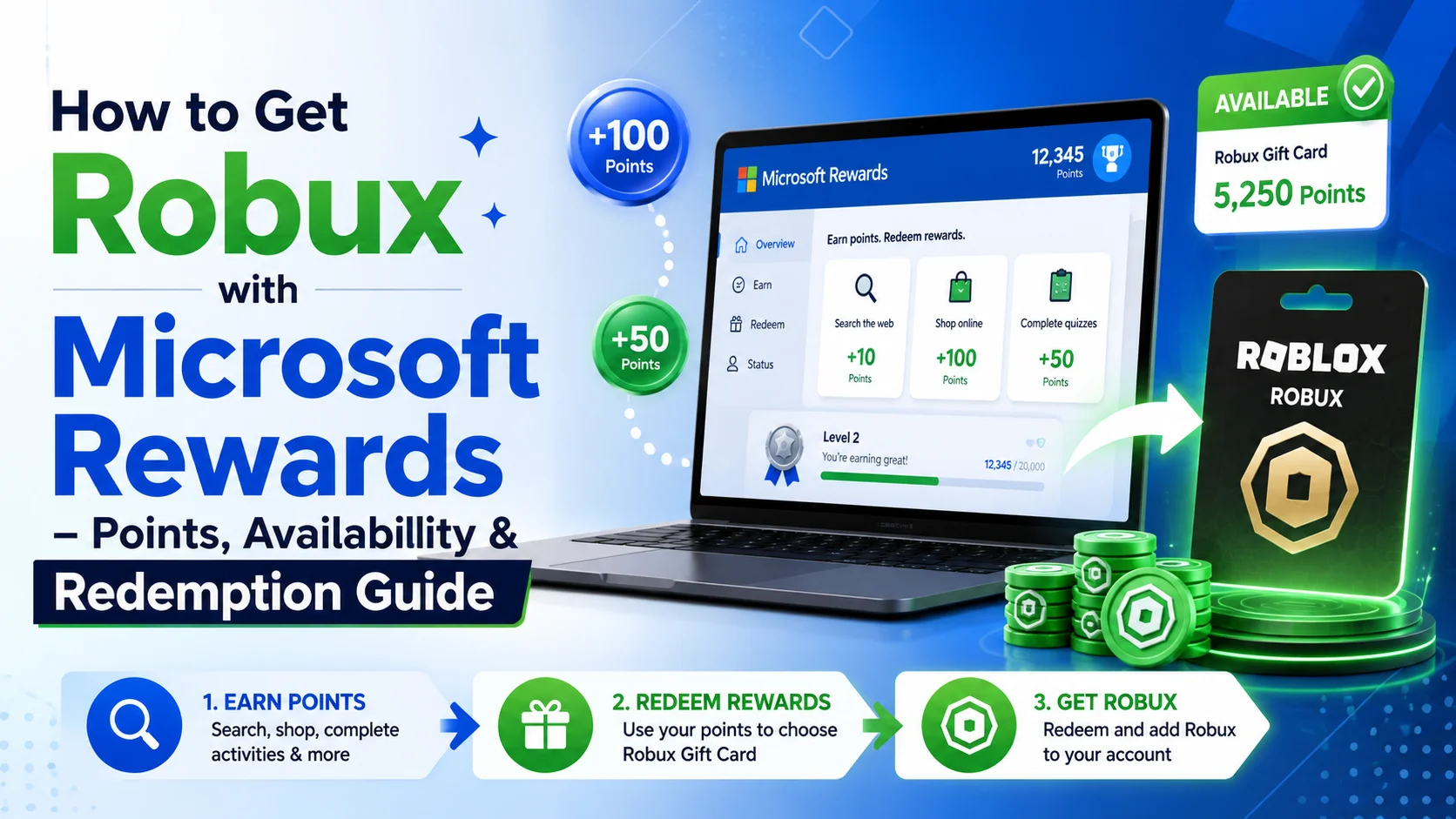

✅ Quick Answer
Yes, you can get Robux with Microsoft Rewards — but it’s not available to everyone. Microsoft Rewards lets you earn points through Bing searches, quizzes, and daily tasks, then redeem them for Roblox Digital Gift Cards where available. Availability depends on your country, account status, and current catalog stock. Always check your own Rewards dashboard at rewards.microsoft.com before saving up points for Robux.
📄 Table of Contents
- What Is Microsoft Rewards?
- Can You Still Get Robux with Microsoft Rewards?
- How to Check if Robux Is Available in Your Account
- How Many Points Do You Need for Robux?
- How to Earn Microsoft Rewards Points
- How to Redeem Points for Robux (Step-by-Step)
- Tips to Earn Points Faster (Safely)
- Why Is Robux Missing from Microsoft Rewards?
- Safe Alternatives If Roblox Is Unavailable
- FAQ
If you play Roblox regularly, you’ve probably wondered whether Microsoft Rewards is actually worth using to get free Robux. Short answer: it can be, as long as you know what to expect. It’s not a Robux generator — it’s a legitimate rewards program from Microsoft that sometimes includes Roblox gift cards as a redemption option.
This guide covers everything: how the program works, how many points you need, step-by-step redemption instructions, why Roblox might not show up in your dashboard, and what to do if it’s not available for your account.
What Is Microsoft Rewards?
Microsoft Rewards is a free loyalty program by Microsoft that lets you earn points (called Microsoft Points) through everyday activities like searching with Bing, completing quizzes, doing daily tasks, and sometimes through Xbox and Microsoft Store activity.
Those points can then be redeemed for gift cards, Xbox credits, sweepstakes entries, or — in some regions — Roblox Digital Gift Cards. The program is free to join and tied to your Microsoft account.
💡 Note: Microsoft Rewards does not give Robux directly. What it offers is a Roblox Digital Gift Card code, which you then redeem on Roblox’s website to get Robux or Roblox credit. Availability of this reward varies by region and changes over time.
Can You Still Get Robux with Microsoft Rewards?
Yes — but with one important caveat: it’s not guaranteed for everyone. Some accounts will see a Roblox gift card option in their Rewards catalog. Others won’t see it at all. This is normal.
The reward tends to show up most consistently for users in the United States. Players in Canada, the UK, and a handful of other supported regions have also reported seeing it. If you’re outside these regions, you may not see any Roblox option at all.
Availability at a Glance
| Region | Roblox Reward Available? | Notes |
|---|---|---|
| United States | Most likely ✔ | Best availability; check your dashboard |
| United Kingdom | Sometimes ✔ | Can appear, but not always in stock |
| Canada / Australia | Sometimes ✔ | Varies by account and catalog rotation |
| Other Countries | Unlikely ✘ | Microsoft or Xbox gift cards may be available instead |
The best approach: treat Microsoft Rewards as a possible way to get Robux rather than a guaranteed one. Two people in the same country can have different rewards in their catalogs.
How to Check if Robux Is Available in Your Account
Before spending any time earning points, confirm whether Roblox is actually in your catalog. Here’s how:
- Sign in to your Microsoft account at rewards.microsoft.com
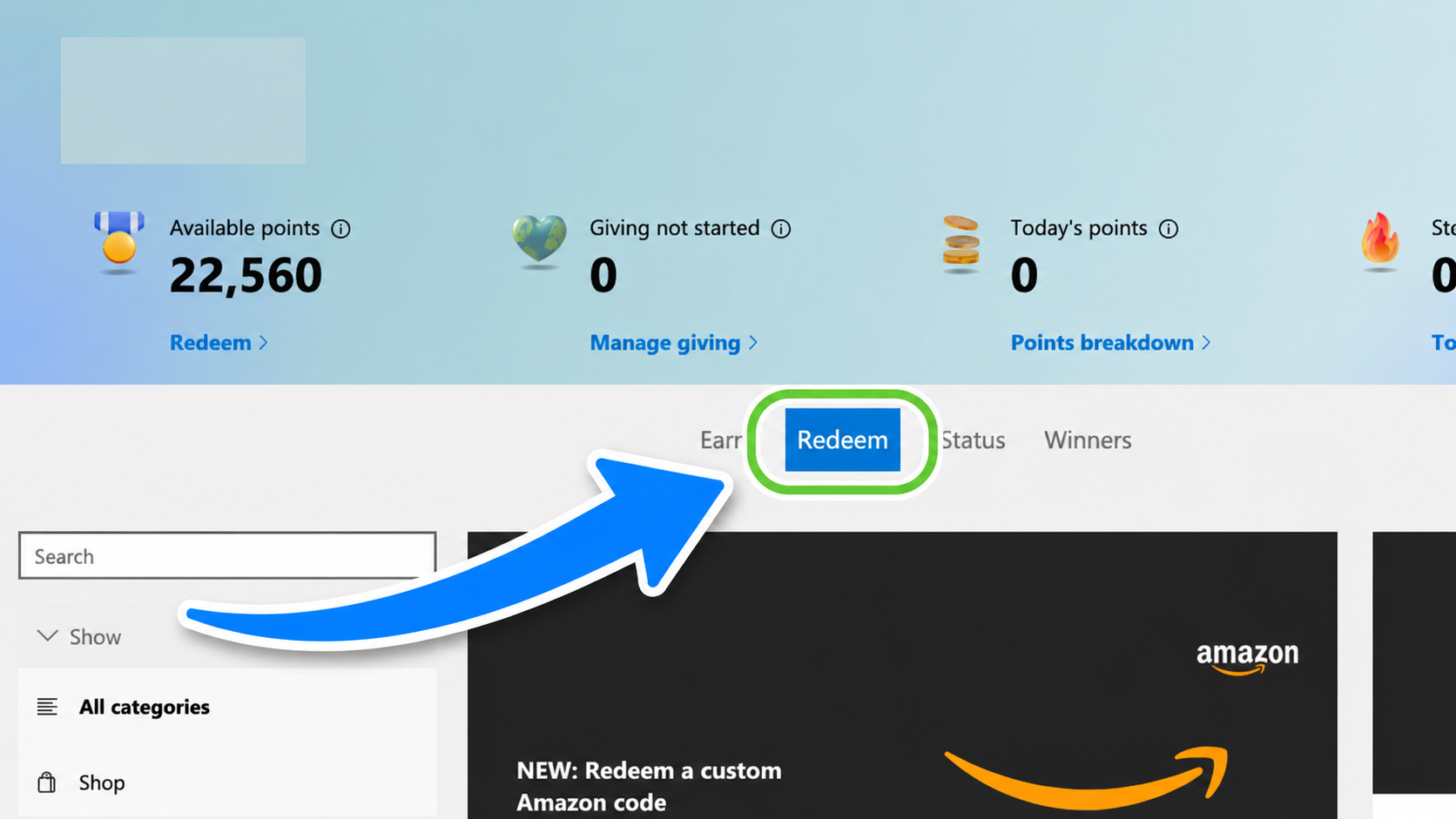
- Click the Redeem tab at the top of the dashboard
- In the search bar on the Redeem page, type “Roblox”
- Scroll through results for any Roblox Digital Card or Roblox gift card options
- If Roblox appears, click it to see the available denominations and point costs
- If it doesn’t appear, it’s not currently available for your account — check back later
⚠️ Important: Don’t rely on screenshots from older articles or YouTube videos. The catalog changes. The only accurate source is your own signed-in Rewards dashboard. Always check before saving toward a specific goal.
SEE ALSO: (Official Ways) Get Free Robux in Roblox (Ultimate Guide)
How Many Points Do You Need for Robux?
Microsoft Rewards doesn’t offer a fixed “X points = X Robux” deal that works everywhere.
What you’ll see — if Roblox is available — are gift card denominations listed by dollar value (e.g., $5, $10, $25). You then redeem that card on Roblox for Robux.
Here’s a general reference for what Robux you get from Roblox gift card values (as of 2024–2025 pricing):
| Gift Card Value | Approx. Robux | Est. Points Needed* |
|---|---|---|
| $5 Roblox Gift Card | ~400 Robux | ~5,000 pts (varies) |
| $10 Roblox Gift Card | ~800 Robux | ~10,000 pts (varies) |
| $25 Roblox Gift Card | ~2,000 Robux | ~25,000 pts (varies) |
| $50 Roblox Gift Card | ~4,500 Robux | ~50,000 pts (varies) |
*Point costs are estimates only and differ by region and current promotions. Always check the live price in your Microsoft Rewards dashboard.
💡 Pro Tip: Microsoft sometimes runs Level 2 discounts or limited-time promotions where the same gift card costs fewer points. If you’re a Level 2 Rewards member, you may get a better deal than the standard rate. Check the Redeem page regularly.
How to Earn Microsoft Rewards Points
Here’s every legitimate way to stack up Microsoft Points. These are all free activities — no purchases required for the basics.
🔍 1. Bing Search (PC + Mobile)
This is the biggest daily earner. Search with Bing while signed in on both desktop and your phone. Most regions allow separate daily caps for desktop and mobile searches, so doing both doubles your daily search points. Keep searches real and varied — fake or repeated searches can get your account flagged.
📚 2. Daily Sets and Quizzes
Your Rewards dashboard shows a daily set with polls, trivia, and featured activities. Each one gives a small number of points, but completing them every day builds up fast. Some regions also reward you with streak bonuses for completing daily sets on consecutive days — don’t miss a day if you’re on a streak.
📱 3. Microsoft Edge and Microsoft Start App
In some regions, you can earn extra points by using Microsoft Edge to browse or by checking in through the Microsoft Start app. If these offers appear in your dashboard, they’re worth doing — they take almost no extra time.
🎮 4. Xbox Quests
If you have an Xbox, check the Rewards hub on your console. Xbox quests can include things like launching eligible games, playing for a set amount of time, or completing in-game milestones. These points add up especially if you’re already gaming regularly.
🛒 5. Microsoft Store Purchases
Eligible purchases on the Microsoft Store can earn points. This one isn’t free, but if you were already going to buy something (a game, movie, or app), using your Microsoft account to buy it earns bonus points on top.
| Earning Method | Cost | Best For |
|---|---|---|
| Bing searches (PC) | Free | Daily consistent earner |
| Bing searches (mobile) | Free | Extra points on top of PC cap |
| Daily sets and quizzes | Free | Streak bonuses, quick daily tasks |
| Microsoft Edge / Start app | Free | Easy bonus points (region-based) |
| Xbox quests | Free (with Xbox) | Big bonus for active Xbox users |
| Microsoft Store purchases | Paid | Bonus on planned purchases |
How to Redeem Points for Robux (Step-by-Step)
Once you have enough points and Roblox is showing in your catalog, here’s how to redeem and actually get the Robux into your account.
Go to rewards.microsoft.com and sign in
Make sure you’re signed into the exact Microsoft account that has the points you want to redeem.
Click the Redeem tab
Find it in the top navigation of the Rewards dashboard.
Search for “Roblox” in the catalog
Use the search bar to find Roblox Digital Card or Roblox Gift Card options.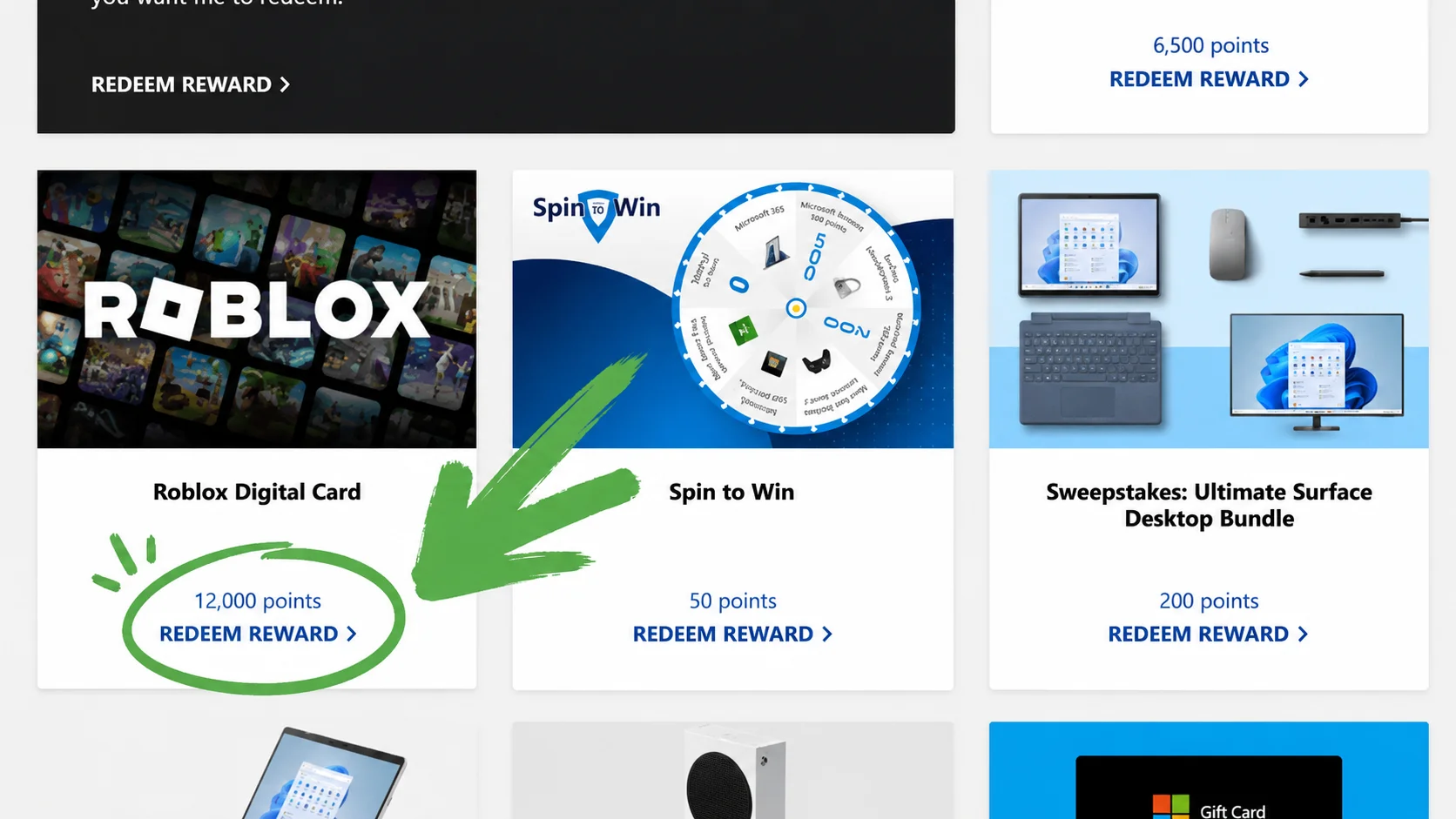
Select your preferred denomination and review the points cost
Confirm the point price before you commit. Make sure you have enough points in your balance.
Confirm the redemption
After confirming, Microsoft will issue a gift card code. Check your email or the Rewards order history for the code.
Go to roblox.com/redeem
Sign in to your Roblox account first, then enter the code on the official Roblox gift card redemption page.
Robux added to your account ✔
Once the code is applied, the Roblox credit (or Robux) will appear in the account you redeemed it on. This cannot be undone or transferred, so double-check you’re on the right account first.
🎮 Alternate Route: Xbox or Microsoft Store
If no Roblox gift card is available in your catalog, you can sometimes redeem points for a Microsoft Store or Xbox Gift Card, then use that balance to buy Robux directly inside the Roblox app on Xbox or Windows. This depends on your region and Roblox’s supported purchase methods. On Xbox: open Roblox → pick a Robux package → select Microsoft account balance at checkout.
Tips to Earn Points Faster (Safely)
You don’t need any tricks — just consistency. Here are the habits that make the biggest difference:
- Do both desktop and mobile Bing searches every day. If your region supports both, you’re potentially doubling your daily search points without any extra effort.
- Never miss the daily set. It only takes 2–3 minutes and maintaining a streak can unlock streak bonuses.
- Check for punch cards and limited offers. Microsoft occasionally adds limited-time activities worth a lot more than the usual tasks. Look for the “Punch Card” section in your dashboard.
- Use Edge for daily browsing if you’re a Windows user. Some users in eligible regions earn passive points just from using Edge as their browser.
- Link your Xbox account. Xbox quests can easily add hundreds of bonus points per week for active gamers.
- Set a daily alarm or habit stack it with something else. The easiest way to stay consistent is pairing the Bing searches + daily set with something you already do every morning (like checking social media).
Do’s and Don’ts
| ✅ DO | ❌ DON’T |
|---|---|
| Do searches on both PC and phone daily | Don’t use bots or auto-search scripts |
| Complete the daily set every day | Don’t create multiple fake accounts |
| Use the official Microsoft Rewards website | Don’t use a VPN to fake your region |
| Check the catalog regularly for Roblox | Don’t share your gift card code publicly |
| Enable 2FA on your Microsoft account | Don’t enter your password on unofficial sites |
Why Is Robux Missing from Microsoft Rewards?
If you’ve checked your catalog and can’t find any Roblox option, you’re not doing anything wrong. Here are the most common reasons:
| Reason | What It Means | What You Can Do |
|---|---|---|
| Region not supported | Roblox gift cards aren’t offered in your country | Try Xbox or Microsoft Store credit as an alternative |
| Temporarily out of stock | The reward ran out of digital codes | Check back again after a few days |
| Account eligibility | New, restricted, or unverified accounts may see a limited catalog | Verify your account, add a phone number, build activity history |
| Catalog rotation | Microsoft updates the catalog periodically | Check weekly; it may reappear |
| Not signed into the right account | You may be checking a different Microsoft account | Sign out and sign in with the correct account |
One thing to never do: use a VPN or change your account’s region to try to access the Roblox reward from another country. This can violate Microsoft Rewards’ terms, cause redemption errors, or even get your account suspended. It’s not worth the risk.
Safe Alternatives If Roblox Is Unavailable
If Roblox isn’t showing up in your Microsoft Rewards catalog, here are your best legitimate options:
❌ One Thing to Always Avoid
Websites that promise “free Robux” in exchange for surveys, downloads, or your Roblox password are scams. They either steal your account, give you nothing, or install malware. There is no such thing as a legitimate Robux generator. Only official channels can give you Robux.
- Buy Robux directly from Roblox.com — The safest, most reliable option. No waiting required.
- Buy an official Roblox gift card from retailers like Walmart, Target, GameStop, or Amazon. Redeem it on roblox.com/redeem.
- Redeem Microsoft or Xbox gift cards for Microsoft account credit and use it to buy Robux on Xbox or through the Microsoft Store version of Roblox.
- Get Roblox Premium — If you buy Robux regularly, Premium gives you a monthly Robux allowance plus a 10% bonus on purchases, which is a better deal over time.
- Earn Robux as a creator — If you’re into game design, you can earn Robux by building and monetizing your own Roblox experience.
Frequently Asked Questions
🎯 Final Verdict
Microsoft Rewards is a legitimate and safe way to earn Robux — when Roblox is available in your region’s catalog. It won’t make you rich in Robux overnight, but if you build a daily habit around Bing searches and the dashboard tasks, you can realistically earn enough for a small Roblox gift card every few weeks without spending a single cent.
The key is to always check your own signed-in dashboard first, use only the official Microsoft and Roblox websites, and never fall for fake “free Robux” generators. Stick to the legit route and it actually works.

Abhigyan identifies himself as a tech geek, gaming cognoscenti, and also a connoisseur of music. Unidentified and mysterious phenomena never fail to gather his undivided attention. When not reading about bizarre and perplexing entities across the Universe, he can often be found cheering for his favorite teams in Football.