


Embark Studios surprised ARC Raiders players with a free cosmetic reward tied to their other game The Finals.
As part of the Cold Snap update promotion, players can unlock a special Ryder outfit inspired by The Finals without spending any coins.
If you want the outfit and are unsure how the crossover works, this guide explains exactly how to unlock The Finals outfit for free and how to use it inside ARC Raiders.
What Is The Finals Outfit in Arc Raiders
The Finals outfit is a Ryder outfit skin themed after Embark Studios’ first person shooter The Finals.
- It is a cosmetic reward only
- It does not provide gameplay advantages
- It is earned through a crossover challenge
- It is permanently added to your ARC Raiders account once unlocked
This event is designed to encourage ARC Raiders players to try The Finals while rewarding them with a unique outfit.
Important Requirement Before You Start
Before doing anything, make sure of one critical thing.
You must log into The Finals using the same account you use for ARC Raiders.
This applies to
- Steam accounts on PC
- PlayStation accounts
- Xbox accounts
If the accounts do not match, the reward will not transfer.
How To Unlock The Finals Outfit for Free
To unlock the outfit, you need to complete a simple challenge inside The Finals.
The Challenge Objective
The requirement is very straightforward.
-
Play 3 matches in any game mode
You do not need to win
You do not need a specific mode
You must finish each match
SEE ALSO:
- Arc Raiders Where To Find Empty Wine Bottle
- Arc Raiders Where To Find Snowballs
- Arc Raiders How To Get Barricade Kit Blueprint on Stella Montis
- Arc Raiders Groundbreaking Quest Guide
Step by Step Guide to Complete the Challenge
Follow these steps exactly to avoid issues.
-
Install The Finals on your platform of choice
-
Launch the game and log in using the same account as ARC Raiders
-
From the main menu, open the Arc Raiders tab
-
Locate and track the challenge that requires playing 3 matches
-
Go to the Play tab
-
Select any available game mode
-
Play and complete the full match
-
Repeat this process until you have completed 3 matches
After finishing the third match, the challenge will automatically complete.
How To Claim the Outfit in Arc Raiders
Once the challenge is completed in The Finals, the reward is sent directly to your ARC Raiders account.
To equip the outfit:
-
Launch Arc Raiders
-
From the main menu, open the Raiders tab
-
Enter the Raiders Den
-
Select Customization
-
Choose Outfit
-
Select The Finals outfit
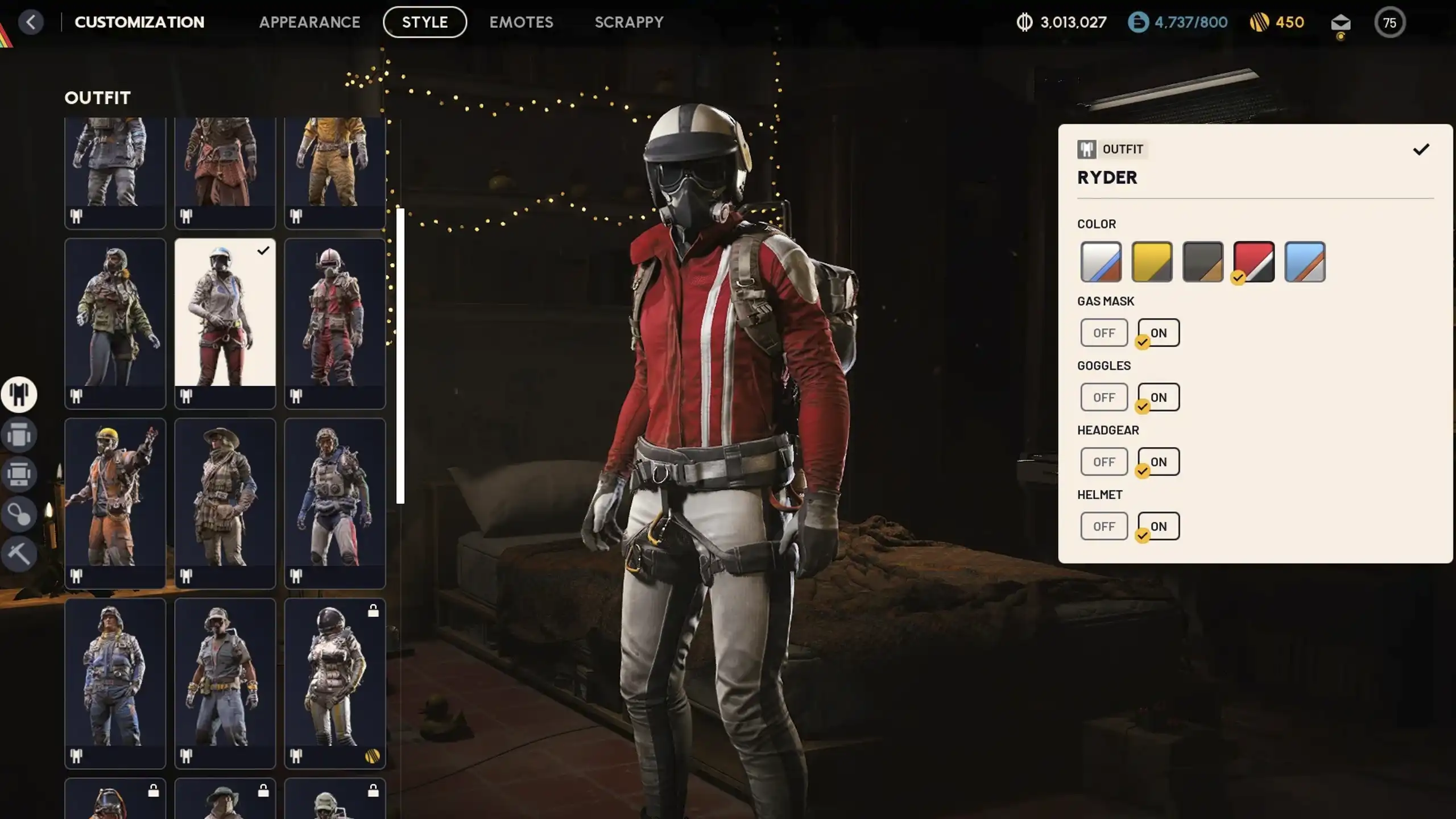
You can now use the outfit in your raids.
Common Mistakes to Avoid
-
Do not quit matches early in The Finals
-
Do not switch accounts between games
-
Do not uninstall The Finals before completing all three matches
-
Do not expect the reward to appear instantly if the match is still processing
If the outfit does not appear right away, restart ARC Raiders once.
Final Thoughts
This crossover reward is one of the easiest free cosmetics to unlock in Arc Raiders. Playing just three matches of The Finals gives you a permanent outfit with no grinding, no combat difficulty, and no extraction risk.
If you enjoy Embark Studios’ style, it is also a good chance to experience The Finals while earning something useful back in ARC Raiders.
Nishant Singh is a gaming writer with a passion for Roblox and the Call of Duty franchise. He enjoys exploring new titles, sharing tips, and writing stories that bring the gaming world to life.