


Shift Lock is one of the most useful camera features in Roblox, especially for obbies, PvP games, and experiences that require precise movement.
On PC, Shift Lock is enabled with a single key, but on Roblox mobile, many players get confused because the option does not always appear by default.
This guide explains how Shift Lock works on Roblox mobile, how to enable it when available, why it sometimes does not show up, and what you can do if your game does not support it.
What Is Shift Lock in Roblox?
Shift Lock is a camera mode that locks your character’s movement direction to the camera. Instead of your character rotating freely, they stay aligned with where the camera is facing.
This is especially helpful for:
-
Obby games that require straight movement
-
Fighting and PvP games
-
Horror games with tight spaces
-
Third-person shooter style experiences
On mobile, Shift Lock works differently compared to PC, and not all games support it.
Can You Use Shift Lock on Roblox Mobile?
Yes, Shift Lock is available on Roblox mobile, but only under specific conditions:
-
The game must support Shift Lock
-
The developer must allow it in the game settings
-
Your Roblox settings must have it enabled
If any of these conditions are not met, the option will not appear.
How to Enable Shift Lock on Roblox Mobile (Step-by-Step)
Follow these steps carefully.
Method 1: The Shift Lock Like Trick That Works on Mobile
If you do not see any Shift Lock switch in settings, do this.
Step 1: Open the Roblox in game menu
Tap the Roblox logo in the top left corner.
Step 2: Go to Settings
Step 3: Change Camera Mode to Classic
Find Camera Mode and switch it from Follow to Classic.
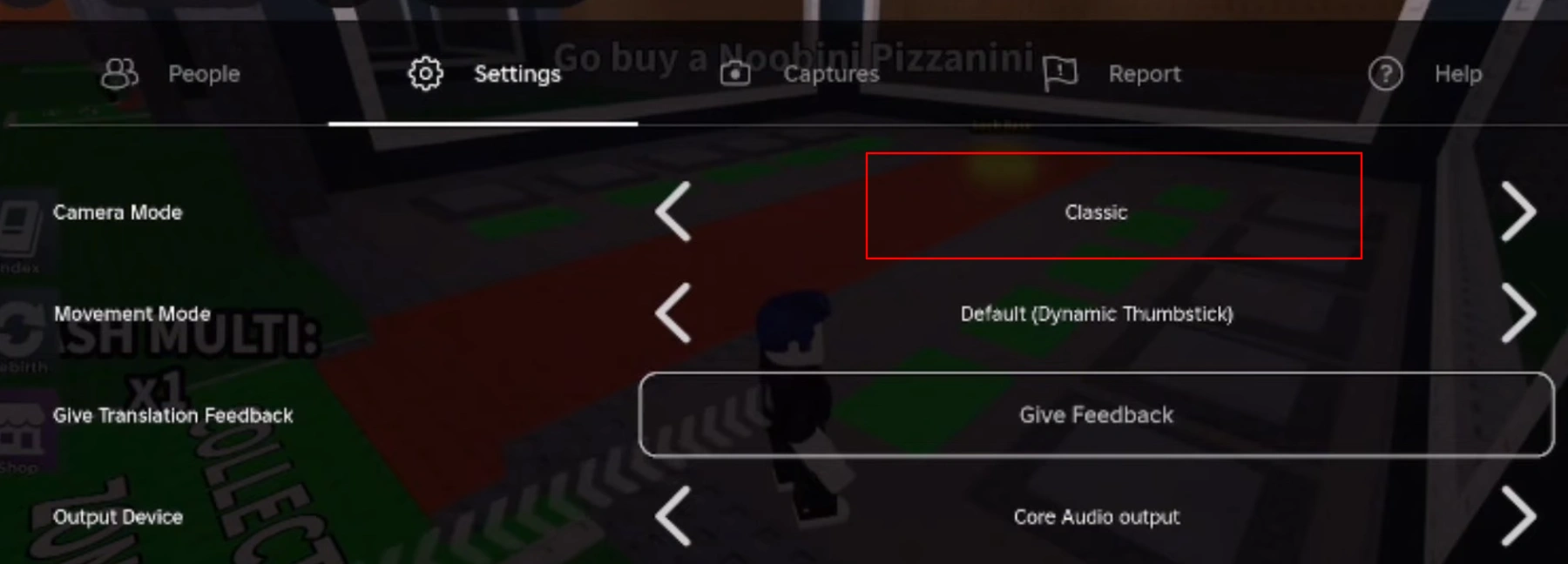
Step 4: Zoom in slightly
Use two fingers to pinch and zoom the camera closer to your character’s head. You do not need full first person. Just slightly closer than the default zoom works best.
What happens next
In Classic camera mode, your character starts to follow the direction your camera is pointing more naturally. This makes your movement feel like Shift Lock, especially for obbies and combat games, because you can strafe and turn smoothly without the camera fighting you.
Important note : This is not the true Shift Lock feature. It is a control trick that mimics it.
Method 2: Real Shift Lock on Roblox Mobile
Sometimes Roblox mobile does show a Shift Lock switch and a lock icon, but it depends on the game and device UI.
Step 1: Open the Roblox in game menu
Tap the Roblox logo.
Step 2: Go to Settings
Step 3: Look for Shift Lock Switch
If it exists, turn it on.
Step 4: Use the lock icon
You will see a small lock button on screen. Tap it to enable or disable Shift Lock.
If you do not see Shift Lock Switch :
That usually means the game does not support Shift Lock on mobile, or the game uses a camera system that blocks it. In that case, use the Classic camera method above.
Best Alternatives If Shift Lock Is Not Available
If a game does not support Shift Lock on mobile, you can still improve control by:
-
Lowering camera sensitivity
-
Using manual camera alignment while moving
-
Playing in first-person mode if available
These are not perfect replacements, but they help in precision-based gameplay.
FAQs About Shift Lock on Roblox Mobile
Does Shift Lock work on all mobile devices?
Yes, if the game supports it. The feature works on both Android and iOS.
Is Shift Lock automatic on mobile?
No. You must manually enable it in settings when the game allows it.
Why do PC players always have Shift Lock but mobile players do not?
PC has universal keyboard support, while mobile relies on developer-enabled UI buttons.
Can developers remove Shift Lock entirely?
Yes. Developers have full control over whether Shift Lock is enabled or disabled in their games.
Final Thoughts
Shift Lock on Roblox mobile does exist, but it depends heavily on the game you are playing. If the option is available, enabling it can dramatically improve movement accuracy and overall gameplay experience. If it is missing, the limitation comes from the game itself, not your device or Roblox app.
Always test multiple games before assuming Shift Lock is unavailable on your mobile.

Ankit kumar is a Digital Marketing Manager and a fan of the COD franchise and Roblox. Perfection is his forte, and the same can be seen in his work. He loves to invest his time in creating awesome content, doing SEO and discovering the latest games.