

Grow a Garden 2 is not only about planting seeds, growing crops, stealing fruits, collecting pets, and expanding your garden. The game also includes fun gear items that let players interact with others in creative ways. One of the most entertaining items is the Megaphone.
The Megaphone lets you play Roblox Sound IDs inside Grow a Garden 2. This means you can broadcast meme sounds, funny effects, songs, phonk tracks, Roblox audio clips, and classic music codes while standing near your garden or hanging around other players.
In this guide, we will cover the best Grow a Garden 2 Megaphone Sound IDs and codes, how to get the Megaphone, how to use Roblox Sound IDs, why some codes may not work, and the best funny, meme, music, phonk, and trolling sounds to try in-game.
Quick Summary:
Game: Grow a Garden 2
Item: Megaphone
Item Type: Gear
Main Use: Plays Roblox Sound IDs
Where to Buy: Gear Shop from George NPC
Price: Around 8,000 Sheckles or 49 Robux
Best Use: Playing funny sounds, meme songs, phonk tracks, and Roblox audio clips around other players
Related Guides: You can also check our Roblox Music IDs and Song Codes, Roblox Game Codes, Best Roblox Games to Play, and Roblox Guides for more Roblox updates and codes.
What Is the Megaphone in Grow a Garden 2?
The Megaphone is a gear item in Grow a Garden 2 that lets players play Roblox audio by entering Sound IDs. Once you equip it, you can paste a working Roblox Sound ID into the Megaphone menu and play that sound in-game.
This makes the Megaphone one of the most fun social items in the game. You can use it for music, memes, jokes, trolling friends, playing phonk songs, or creating funny moments near gardens.
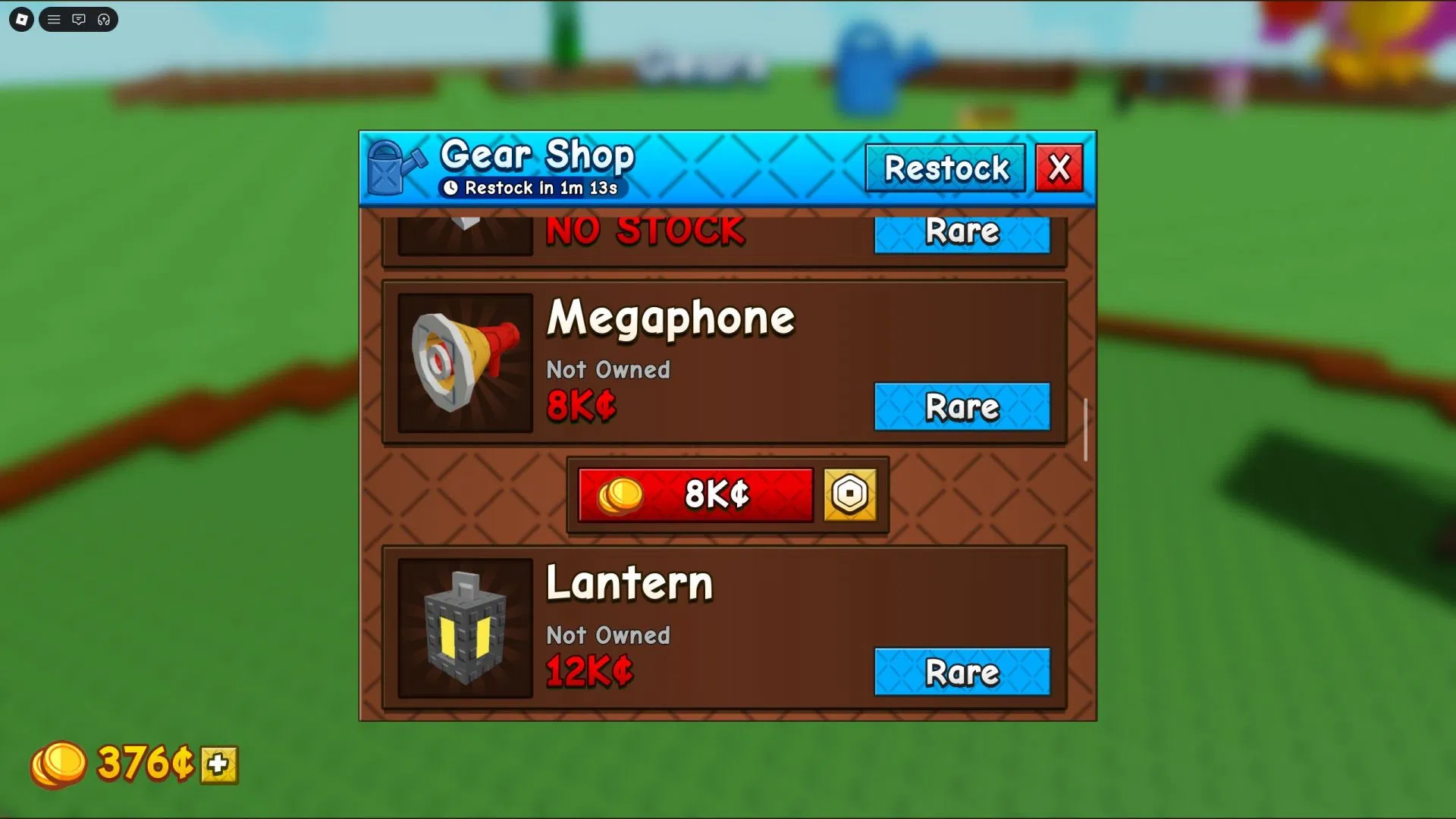
| Megaphone Detail | Information |
|---|---|
| Item Name | Megaphone |
| Item Type | Gear |
| Rarity | Rare |
| Effect | Plays Roblox Sound IDs |
| Price | Around 8,000 Sheckles or 49 Robux |
| Availability | Currently obtainable |
How to Get the Megaphone in Grow a Garden 2
You can get the Megaphone from the Gear Shop. The Gear Shop is where players can buy useful gear items for farming, movement, fun interactions, and special gameplay effects.
- Launch Grow a Garden 2 on Roblox.
- Go to the center area of the map.
- Find the Gear Shop.
- Talk to the George NPC.
- Look for the Megaphone in the gear list.
- Buy it using Sheckles or Robux.
- Equip the Megaphone from your inventory.
SEE ALSO:
How to Use Sound IDs with the Megaphone
After buying and equipping the Megaphone, you can use Roblox Sound IDs to play audio in Grow a Garden 2.
- Equip the Megaphone from your inventory.
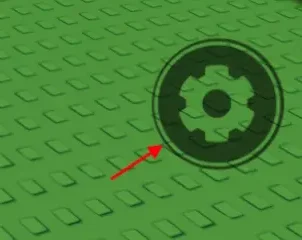
- Click the Megaphone settings or gear icon on your screen.
- Find the Sound ID input box.
- Copy a working Roblox Sound ID.
- Paste the ID into the Megaphone box.
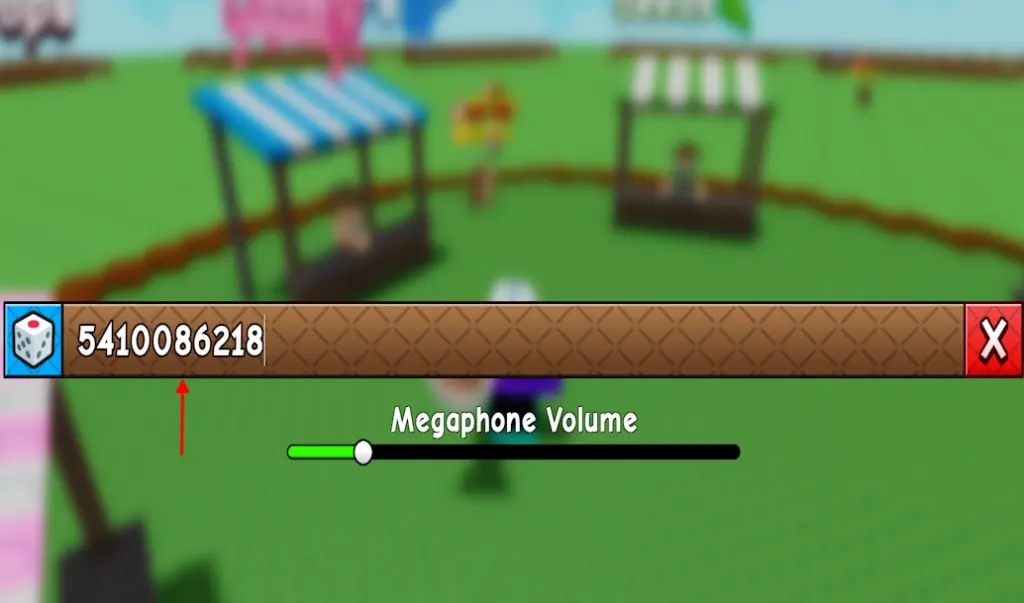
- Press Enter or confirm the sound.
- The Megaphone will play the selected sound in-game.
If the sound does not play, the ID may be removed, private, moderated, too quiet, region-restricted, or not compatible with the current Roblox audio system.
Best Grow a Garden 2 Megaphone Sound IDs
Here are some of the best Sound IDs and codes you can try with the Megaphone in Grow a Garden 2. These include meme sounds, popular songs, funny effects, phonk tracks, and classic Roblox audio IDs.
| Sound / Song Name | Sound ID Code | Best For |
|---|---|---|
| Crab Rave | 5410086218 | Party music near your garden |
| Raining Tacos | 142376088 | Funny classic Roblox music |
| Tokyo Drift / Hypno Train | 1837015626 | Fast-paced music |
| Windows XP Theme | 1626996526 | Nostalgic sound effect |
| Whatcha Say | 168208965 | Meme moments |
| Stadium Rave | 1846368080 | Chaotic lobby music |
| Spooky Scary Skeletons | 515669032 | Spooky or night-time vibe |
| You’ve Been Rick Rolled | 7363412529 | Trolling friends |
| Better Call Saul Theme | 9106904975 | Funny dramatic moments |
| Elevator Music | 9119119619 | Chill background sound |
Funny Megaphone Sound IDs for Grow a Garden 2
If you want to make your friends laugh or create funny moments while farming, use these funny and meme-style Sound IDs.
| Funny Sound | Sound ID | Use Case |
|---|---|---|
| Frog Laughing | 140055886382926 | Laughing after stealing fruit |
| Dog Laughing | 128617066830272 | Funny garden moments |
| Funny Scream Sound | 127907022261334 | When someone catches you stealing |
| Troll Laugh | 7816195044 | Trolling friends |
| SpongeBob Laugh | 111605929167392 | Classic funny sound |
| Your Computer Has a Virus | 131799297373079 | Prank sound |
| You Have Been Trolled | 112626671704099 | Best for trolling moments |
| Yippie | 139201825172025 | Celebration sound |
Meme Sound IDs for Grow a Garden 2 Megaphone
Meme sounds are the best choice if you want the Megaphone to feel chaotic and fun. These are great for social servers, group farming, or joking with friends.
| Meme Sound | Sound ID |
|---|---|
| Skibidi Toilet | 109829522404772 |
| Tung Tung Sahur | 128096405862126 |
| Bombardiro Crocodilo | 107128147864287 |
| Brr Brr Patapim | 126271266950979 |
| Lirili Larila | 101207716587722 |
| Tralala | 139165551156941 |
| Sussy Baka | 84153865596533 |
| Original Meme | 140736374485942 |
Phonk Megaphone Sound IDs
Phonk sounds are great if you want a louder, more intense vibe around your garden. These work well when you are showing off rare plants, racing around the map, or creating a dramatic farming moment.
| Phonk Sound | Sound ID |
|---|---|
| Bloody Phonk | 136350225160627 |
| Dark Phonk Damage | 105529482486905 |
| DTI Phonk | 139161205970637 |
| Ghostblade Phonk | 90441404910975 |
| Mad Phonk Energy | 123636731441495 |
| Phonk Killaz | 86179292245507 |
| Raw Phonk Energy | 135549022646779 |
| Robo Phonk | 136932193331774 |
| The Final Phonk | 14145620056 |
Music Sound IDs for Grow a Garden 2 Megaphone
If you want normal music instead of memes, try these music-based Roblox Sound IDs.
| Music / Track | Sound ID |
|---|---|
| Backseat | 94560286217320 |
| California Love | 95002349594321 |
| Hard Rock | 1837853076 |
| Metamorphosis | 15689451063 |
| No Stress TikTok | 82352261905403 |
| Somebody Once Told Me | 139916535857349 |
| World Cup Funk | 92904140157762 |
Brainrot Sound IDs for Grow a Garden 2
Brainrot-style sounds are popular in Roblox because they are loud, chaotic, and funny. These are good if you want your Megaphone to stand out in a crowded server.
| Brainrot Sound | Sound ID |
|---|---|
| 67 Brainrot | 106000088638410 |
| 67 Meme | 127798544476125 |
| Brainrot Divine Drop | 138391671909650 |
| Brainrot Gang Rap | 129839967918512 |
| Ultimate Brainrot | 110789178293428 |
Best Trolling Sound IDs
Use these IDs if you want to troll friends, surprise players, or create funny chaos around someone’s garden. Avoid spamming sounds too much because other players may find it annoying.
| Trolling Sound | Sound ID | Best Moment |
|---|---|---|
| Get Out | 134282584923413 | When someone enters your garden area |
| Stop It | 5305478224 | When someone tries to steal |
| English or Spanish | 138037717278828 | Funny social moment |
| Hell Nah | 105726690559537 | When someone steals your fruit |
| You Are Gonna Die | 124324080021379 | Chaotic meme moment |
Best Megaphone Codes for Different Situations
Not every sound fits every moment. Use this quick table to pick the best Sound ID based on what you are doing in Grow a Garden 2.
| Situation | Best Sound IDs |
|---|---|
| Showing off your garden | 5410086218, 1846368080, 95002349594321 |
| Trolling a friend | 7363412529, 112626671704099, 7816195044 |
| Catching someone stealing | 5305478224, 105726690559537, 127907022261334 |
| Funny server moment | 142376088, 140055886382926, 111605929167392 |
| Phonk vibe | 136350225160627, 123636731441495, 86179292245507 |
| Chill background sound | 9119119619, 1626996526, 82352261905403 |
Why Some Megaphone Sound IDs Do Not Work
Roblox audio IDs can stop working over time. If a Megaphone Sound ID does not play in Grow a Garden 2, it does not always mean you entered it wrong.
Common reasons include:
- The audio was removed from Roblox.
- The sound is private or restricted.
- The sound was moderated.
- The ID is typed incorrectly.
- The audio is too quiet to hear clearly.
- The server is lagging.
- The Megaphone menu did not save the ID.
- The game temporarily blocks certain audio.
- The Roblox audio system changed.
How to Fix Megaphone Sound IDs Not Working
If your Megaphone code is not working, try these quick fixes.
- Copy and paste the Sound ID again.
- Remove extra spaces before or after the code.
- Try a different Sound ID.
- Re-equip the Megaphone.
- Leave and rejoin the server.
- Check your Roblox volume settings.
- Check the in-game sound settings.
- Use a shorter, older, or more common Roblox audio ID.
- Test a known working code like Raining Tacos or Crab Rave.
Tips for Using the Megaphone Without Annoying Everyone
The Megaphone is fun, but it can become annoying if you spam loud sounds nonstop. Use it smartly so other players enjoy the moment too.
- Use short sounds instead of very long clips.
- Do not spam the same sound again and again.
- Use funny sounds during the right moment.
- Avoid loud sounds near players who are farming quietly.
- Use meme sounds with friends or party groups.
- Switch between music, memes, and chill sounds.
- Do not use offensive or inappropriate audio.
- Use lower-chaos sounds if the server is already crowded.
Best Megaphone Sounds for Farming Sessions
If you are farming crops for a long time, you may want sounds that are fun but not too distracting. These IDs work well for background entertainment.
| Sound | ID | Mood |
|---|---|---|
| Elevator Music | 9119119619 | Chill |
| Windows XP Theme | 1626996526 | Nostalgic |
| No Stress TikTok | 82352261905403 | Relaxed |
| Raining Tacos | 142376088 | Funny |
Best Megaphone Sounds for Stealing Moments
Grow a Garden 2 includes stealing mechanics, so the Megaphone can make those moments even funnier. Use these when someone steals from you or when you successfully escape after stealing fruit.
| Moment | Recommended Sound ID |
|---|---|
| You caught a thief | 5305478224 |
| You successfully stole fruit | 7816195044 |
| Someone steals your rare crop | 127907022261334 |
| You want to troll your friend | 7363412529 |
Are Megaphone Sound IDs the Same as Roblox Music Codes?
Yes, the Megaphone uses Roblox Sound IDs, which are often also called Roblox music codes, audio IDs, or song IDs. If a Roblox audio ID works with the current Roblox audio system and is allowed in Grow a Garden 2, you can try it with the Megaphone.
However, not every Roblox music code will work. Some audio files are removed, set to private, moderated, or blocked from being used in experiences.
Can You Change the Megaphone Sound?
Yes, you can change the sound by opening the Megaphone settings menu and entering a different Roblox Sound ID. This makes it easy to switch between music, memes, phonk, funny effects, and trolling sounds.
For example, you can use a chill sound while farming, then switch to a troll sound when a friend tries to steal fruit from your garden.
Is the Megaphone Worth Buying?
The Megaphone is worth buying if you enjoy social items, funny audio, memes, or playing with friends. It does not directly make your crops grow faster, but it makes the game more entertaining.
You should buy the Megaphone if:
- You enjoy Roblox music codes.
- You play with friends often.
- You like meme sounds.
- You want to make your garden area more fun.
- You already have enough Sheckles for extra gear.
- You want a funny item for social servers.
You may want to skip it early if you are still saving Sheckles for more important farming upgrades, pets, seeds, or progression items.
Best Overall Megaphone Sound IDs
If you only want the best quick picks, start with these codes:
| Rank | Sound | ID | Why It Is Good |
|---|---|---|---|
| 1 | Crab Rave | 5410086218 | Fun, recognizable, and great for parties. |
| 2 | Raining Tacos | 142376088 | Classic Roblox sound with funny energy. |
| 3 | You’ve Been Rick Rolled | 7363412529 | Perfect troll sound. |
| 4 | Frog Laughing | 140055886382926 | Great for funny moments. |
| 5 | Bloody Phonk | 136350225160627 | Strong phonk vibe for chaotic servers. |
Final Thoughts
The Megaphone is one of the most fun gear items in Grow a Garden 2 because it lets you play Roblox Sound IDs directly in-game. You can use it for music, memes, trolling, phonk tracks, funny sound effects, or chill background audio while farming.
The best Megaphone Sound IDs to start with are 5410086218 for Crab Rave, 142376088 for Raining Tacos, 7363412529 for Rick Roll, 140055886382926 for Frog Laughing, and 9119119619 for Elevator Music.
If a sound does not work, try another code from the list because Roblox audio IDs can be removed, moderated, or made private over time. Keep testing different IDs until you find the perfect sound for your garden.
FAQs
What does the Megaphone do in Grow a Garden 2?
The Megaphone plays Roblox Sound IDs in Grow a Garden 2. You can use it to play songs, memes, funny sounds, phonk tracks, and other Roblox audio clips.
How much does the Megaphone cost in Grow a Garden 2?
The Megaphone costs around 8,000 Sheckles or 49 Robux. If the game updates the price, check the Gear Shop for the latest in-game cost.
Where do you buy the Megaphone?
You can buy the Megaphone from George at the Gear Shop in Grow a Garden 2.
How do I use Sound IDs with the Megaphone?
Equip the Megaphone, open its settings menu, paste a Roblox Sound ID into the input box, and confirm it to play the sound.
What is the best Megaphone Sound ID?
Some of the best Megaphone Sound IDs are 5410086218 for Crab Rave, 142376088 for Raining Tacos, 7363412529 for Rick Roll, and 9119119619 for Elevator Music.
Why is my Megaphone Sound ID not working?
The ID may be removed, private, moderated, typed incorrectly, too quiet, or blocked by the Roblox audio system. Try another working Sound ID from the list.
Can I change the Megaphone music?
Yes, you can open the Megaphone settings menu and enter a different Roblox Sound ID whenever you want to change the audio.
Are Megaphone Sound IDs the same as Roblox music codes?
Yes, the Megaphone uses Roblox Sound IDs, which are also commonly called Roblox music codes, audio IDs, or song IDs.
Is the Megaphone worth buying?
Yes, the Megaphone is worth buying if you enjoy funny sounds, memes, music, or social features. It is mostly a fun item, not a farming progression item.
Can other players hear my Megaphone?
Yes, the Megaphone is meant to play sounds in-game, so nearby players may hear the audio depending on game and Roblox sound settings.

Hi, I’m Ankit Kumar, the founder of StealthyGaming. I handle everything from SEO to researching and writing gaming articles. I’m passionate about helping fellow gamers stay updated with the latest tips, guides, and news. When I’m not optimizing content, I’m probably testing out new games or digging into strategies to make my articles as helpful and engaging as possible.