
Queens is one of the trickiest daily Linkedin puzzle games available for free on the platform. The game is inspired by the famous N-Queens problem in logic and chess, it requires careful thinking and elimination skills.
At first glance, the colorful grid and crown symbols might seem overwhelming, but once you understand the rules and strategies, solving it becomes incredibly rewarding.
It’ an easy game once you get it, but even if you do the game can be challenging sometimes. And today, if you are playing it and looking for Linkedin Queens Solution Today #567 (November 18, 2025), you are looking at the right place.
And in this article, we will discuss today’s answer and also talk about how to solve the puzzle efficiently, this guide explains the rules, strategies, and gives a real example to help you play better, strategies to win, and a practical example.
Let’s get started.
What is LinkedIn Queens?
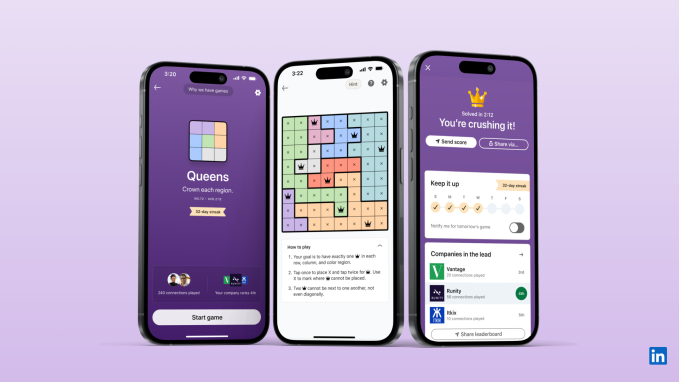
LinkedIn Queens is a logic puzzle where you must place crowns or Queens on the grid under strict rules. The challenge tests your observational and problem solving skills similar to Sudoku.
The rules are simple –
The goal is to have exactly one crown in each row, column, and color region – there are 10 color regions generally. Tap once to place an X (to mark where a crown cannot go), and tap twice to place a crown.
Remember, you have to place the crowns in a way that two crowns cannot touch each other, not even diagonally.
These rules force you to think ahead before placing each crown.
Linkedin Queens Solution for Today #567 (November 18, 2025)
Linkedin Queens is one of the most interesting games on Linkedin. The game is easy to play and doesn’t have much instructions to play.
Well, if you are playing Queens today and couldn’t find the right answer, we will help you. Here, in this article, we will be providing Linkedin Queens #567 Answers for Today, (November 18, 2025).
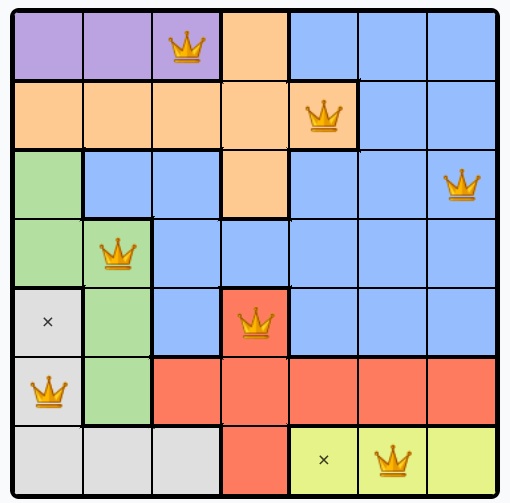
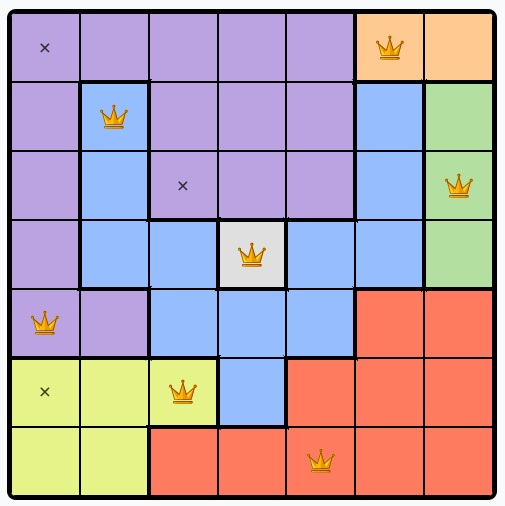
Before you scroll down for the answers, we would like to mention that the image we shared below has solution for the entire game. If you want limited answers, you can check the specific positions for a color queen here –
Blue Queen – Row 3, Column 7
Red Queen – Row 5, Column 4
Grey Queen – N/A
Pink Queen – N/A
Peach Queen – Row 2, Column 5
Silver Queen – Row 6, Column 1
Lavender Queen – Row 1, Column 3
Teal Queen – N/A
Green Queen – Row 4, Column 2
Lime Queen – Row 7, Column 6
Find Solution to All Linkedin Games – Here
Yesterday’s Answer –
Blue Queen – Row 2, Column 2
Red Queen – Row 7, Column 5
Grey Queen – N/A
Pink Queen – N/A
Peach Queen – Row 1, Column 6
Silver Queen – Row 4, Column 4
Lavender Queen – Row 5, Column 1
Teal Queen – N/A
Green Queen – Row 3, Column 7
Lime Queen – Row 6, Column 3
Step-by-Step Strategy to Solve LinkedIn Queens
1. Understand the constraints
Each row, column, and colored block can only contain one crown. That means if you’ve already placed one in a row, the rest of the row is blocked.
2. Use the X marker
Don’t just focus on placing crowns. Use X’s to eliminate impossible spots. This prevents mistakes later when the grid gets tight.
3. Watch diagonals carefully
Unlike Sudoku, crowns cannot even touch diagonally. Before finalizing a crown, scan diagonals to make sure you’re not violating the rule.
4. Focus on color regions
The grid is divided into distinct colored regions. Once you place a crown in one square of a region, you can mark the rest of that region as blocked.
5. Work systematically
Go row by row or region by region. Each crown placement reduces possibilities and helps narrow down where the others must go.
Example Walkthrough