

Minecraft mods can improve performance, rebuild world generation, add new dimensions, introduce automation, or turn a familiar survival world into a completely different game. The difficult part is not finding mods—it is choosing projects that are useful, actively maintained, and compatible with the same Minecraft version and mod loader.
This list covers 50 of the best Minecraft mods available in August 2026. It focuses on Minecraft: Java Edition and includes lightweight client upgrades, multiplayer utilities, world-generation projects, major technology and magic systems, and creative building tools.
Start with Sodium for performance, JEI or EMI for recipes, Jade for block information, Xaero’s Minimap for navigation, Terralith for vanilla-style world generation, Create for automation, and WorldEdit or Axiom for serious building.
Minecraft Java 26.2 is the current stable release, but not every large content mod has moved to 26.2. Many of the strongest modpacks still use 1.21.1 or 1.20.1 because their major mods and dependencies are mature on those versions.
The loader information below describes the project’s common current platforms, not a promise that every loader supports every Minecraft release. Always open the Files or Versions tab and match the Minecraft version, loader, mod version, and dependencies before downloading.
Best Minecraft Mods: Quick Comparison
| Mod | Best use | Main type | Beginner-friendly? |
|---|---|---|---|
| Sodium | Higher FPS | Client performance | Yes |
| FerriteCore | Lower memory use | Optimization | Yes |
| Iris | Shader packs | Graphics | Yes |
| JEI / EMI | Recipes and item search | Utility | Yes |
| Waystones | Fast travel | Gameplay | Yes |
| Terralith | Overworld terrain | World generation | Yes |
| Twilight Forest | Dimension and bosses | Adventure | Mostly |
| Create | Mechanical automation | Technology | Medium |
| Cobblemon | Creature collecting | Total gameplay | Yes |
| WorldEdit | Large builds | Creative tool | Medium |
Looking for something much scarier? Our separate list of the best Minecraft horror mods focuses on stalkers, cave creatures, and survival-horror projects rather than general-purpose mods.
Best Minecraft Performance and Graphics Mods
Start here if you want smoother frame rates, lower memory use, better shaders, or longer views. Performance mods are often client-side, but always read the project page because some optimizations also have server builds.
1. Sodium
Typical loaders: Fabric and NeoForge
Sodium replaces major parts of Minecraft’s rendering system with a faster, more efficient implementation. It can significantly improve frame rate and reduce micro-stutter without changing survival mechanics or making the game look unfamiliar. It is the first performance mod we recommend for most Java Edition players.
Compatibility note: Use a build made for your exact Minecraft version. Sodium is not a shader loader by itself; pair it with Iris if you want shader packs.
2. Lithium
Typical loaders: Fabric and NeoForge
Lithium optimizes physics, mob AI, block ticking, entity tracking, and other game systems while trying to preserve vanilla behavior. It is useful in single-player worlds and on servers, especially around farms, villagers, redstone, or large numbers of entities.
Compatibility note: Lithium and Sodium optimize different parts of the game, so they are commonly installed together.
3. FerriteCore
Typical loaders: Fabric, Forge, and NeoForge
FerriteCore reduces the memory Minecraft uses for block states and related data. The benefit becomes more noticeable as a pack adds more blocks, items, and world content. It will not magically raise FPS on every computer, but it can reduce memory pressure, loading problems, and crashes in larger packs.
Compatibility note: FerriteCore already has releases for Minecraft 26.2, making it one of the safer current optimization choices.
4. ImmediatelyFast
Typical loaders: Fabric, Forge, NeoForge, and Quilt
ImmediatelyFast batches common immediate-mode rendering work more efficiently. It targets entities, block entities, particles, text, maps, and parts of the interface, so its gains can appear in busy bases and crowded screens where a pure chunk renderer may not solve every slowdown.
Compatibility note: The official project supports Minecraft 26.2 and is designed to work beside other mainstream optimization mods.
5. ModernFix
Typical loaders: Fabric, Forge, and NeoForge
ModernFix is a collection of loading-time, memory, and bug fixes aimed mainly at modded Minecraft. Its value is less visible than a dramatic graphics mod, but a compatible build can shorten startup and help large packs behave more reliably.
Compatibility note: ModernFix changes many systems. Read its compatibility notes and test your pack after adding it instead of assuming every combination will work.
6. Entity Culling
Typical loaders: Fabric, Forge, and NeoForge
Entity Culling stops the client from rendering entities and block entities that are hidden behind solid blocks. A storage room full of chests, a villager hall, or a mob-heavy base can become easier to render because the GPU is not drawing objects the player cannot see.
Compatibility note: It is a visual optimization and does not stop server-side mob behavior or farm simulation.
7. Dynamic FPS
Typical loaders: Fabric, Forge, NeoForge, and Quilt
Dynamic FPS lowers resource use when the Minecraft window is unfocused, hidden, idle, or running on battery. You can control background frame rate and audio behavior, helping laptops run cooler and leaving more resources for other programs.
Compatibility note: This mod improves efficiency when Minecraft is in the background; it is not a replacement for Sodium during active play.
8. Iris Shaders
Typical loaders: Fabric and NeoForge
Iris is the preferred shader loader for players using Sodium. It supports many shader packs designed for the OptiFine ecosystem while keeping a modern performance-focused rendering stack. Install it when lighting, shadows, water, and atmosphere matter as much as raw FPS.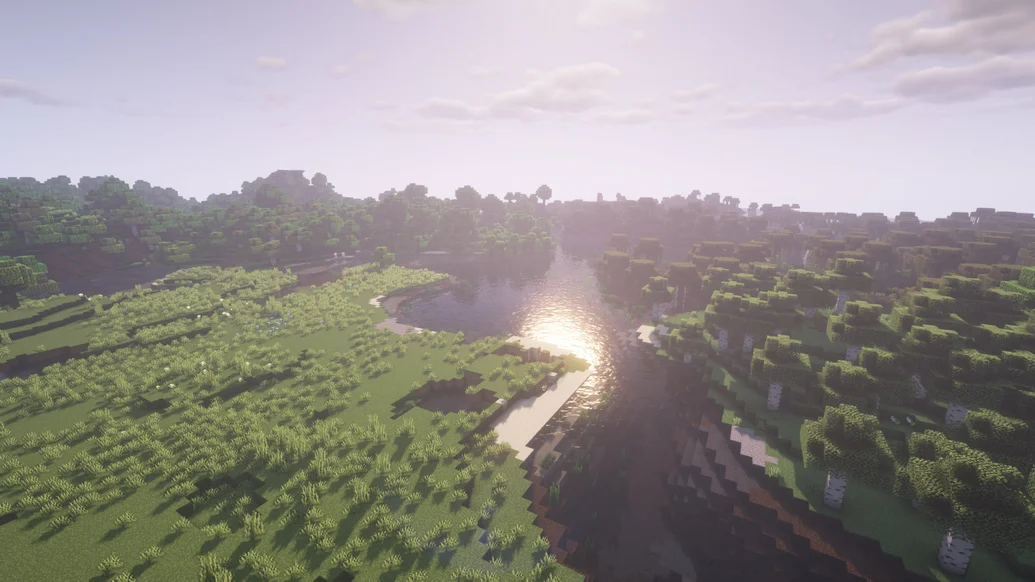
Compatibility note: Shader compatibility varies. Test the exact Iris, Sodium, Minecraft, and shader-pack versions together.
9. Distant Horizons
Typical loaders: Fabric, Forge, and NeoForge
Distant Horizons renders distant terrain as simplified level-of-detail geometry.
This allows mountain ranges and explored landscapes to remain visible far beyond normal render distance at a lower cost than loading full-detail chunks everywhere.
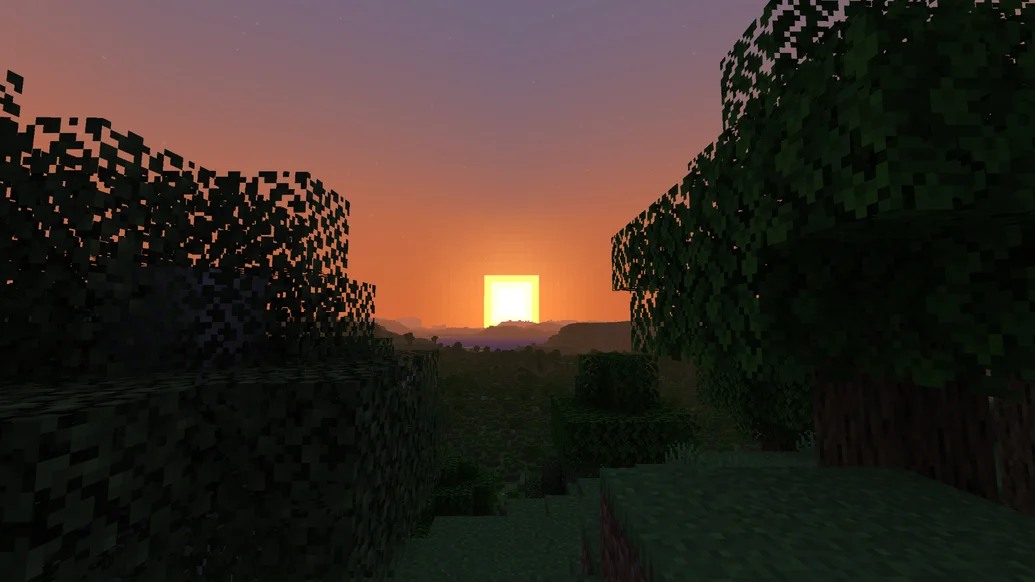
Compatibility note: It needs setup time to generate or cache distant terrain, and shader support depends on the shader pack.
10. Bobby
Typical loaders: Fabric
Bobby stores chunks previously sent by a server and displays them after they move outside the server’s current view-distance limit. It is a clever client-side solution for players who want a wider sense of place without asking a server owner to raise a demanding setting.
Compatibility note: Bobby displays cached terrain; it does not reveal new chunks the server has never sent. The official project supports Minecraft 26.2.
Best Quality-of-Life and Utility Mods
These mods remove repetitive interface work, explain unfamiliar blocks and recipes, improve navigation, or make death and inventory management less frustrating.
11. Just Enough Items (JEI)
Typical loaders: Fabric, Forge, and NeoForge
JEI adds a searchable item list and lets you inspect recipes and uses. It is essential in packs where hundreds of new ingredients make ordinary recipe-book browsing too slow. Search filters, bookmarks, and mod-name filtering help narrow complex crafting chains.
Compatibility note: Many content mods provide JEI integrations, but support depends on the mod and version.
12. EMI
Typical loaders: Fabric, Forge, NeoForge, and Quilt
EMI is a polished recipe and item viewer with favorites, craftable-mode filters, recipe trees, and material-cost breakdowns. It is particularly useful when a final machine requires several nested components and you need to understand the whole crafting path.
Compatibility note: EMI can run beside JEI for runtime recipe compatibility in supported setups, though most players choose one primary interface.
13. Jade
Typical loaders: Fabric, Forge, and NeoForge
Jade displays information about the block, fluid, or entity under your crosshair. Depending on integrations, it can show names, health, tool requirements, machine progress, storage contents, and other details that would otherwise require guesswork.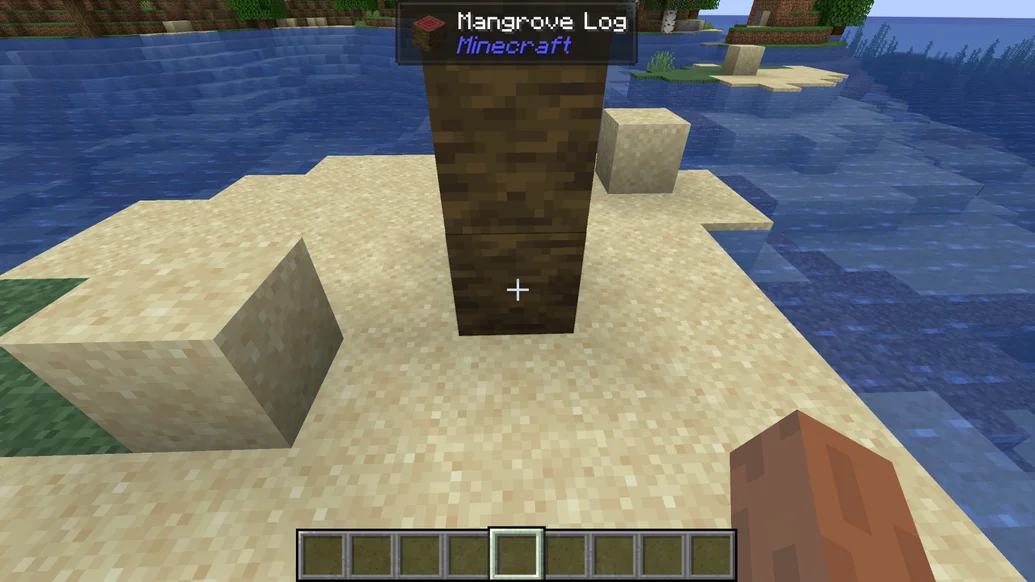
Compatibility note: The overlay is configurable, so disable sections that make the screen feel crowded.
14. AppleSkin
Typical loaders: Fabric, Forge, and NeoForge
AppleSkin shows how much hunger and saturation a food item will restore before you eat it. It also adds useful hunger information to tooltips and the HUD. The mod is small, client-friendly, and especially helpful when a food mod adds many unfamiliar meals.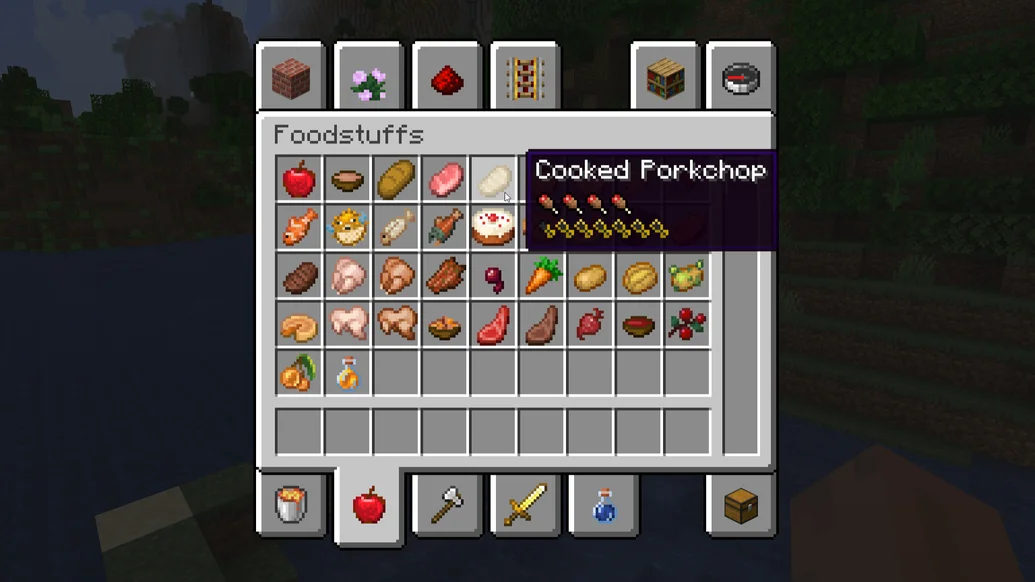
Compatibility note: AppleSkin visualizes food mechanics; it does not change the nutritional values by itself.
15. Mouse Tweaks
Typical loaders: Fabric, Forge, and NeoForge
Mouse Tweaks improves click-and-drag behavior in inventories. It makes splitting, distributing, and shift-moving stacks feel faster and more natural, which saves time during crafting, storage cleanup, and long mining sessions.
Compatibility note: It is easy to overlook, but it is one of the hardest quality-of-life mods to remove after you learn its controls.
16. Xaero’s Minimap
Typical loaders: Fabric, Forge, and NeoForge
Xaero’s Minimap places a customizable map, coordinates, direction indicator, and waypoints on the HUD. Death points help recover gear, while cave and surface modes make exploration easier without constantly opening a full-screen map.
Compatibility note: Server rules may restrict entity radar or cave mapping. Configure the mod to match the server you join.
17. Xaero’s World Map
Typical loaders: Fabric, Forge, and NeoForge
Xaero’s World Map creates a full-screen map from the terrain you explore and integrates naturally with Xaero’s Minimap waypoints. It is ideal for long-term survival worlds where bases, farms, structures, and routes spread over thousands of blocks.
Compatibility note: The map only knows areas your client has received; it is not a seed-revealing cheat.
18. Waystones
Typical loaders: Fabric, Forge, and NeoForge
Waystones adds craftable or generated teleport points that players activate and revisit. Configurable XP costs, cooldowns, and consumable scrolls let a pack creator make travel convenient without removing progression completely.
Compatibility note: Waystones commonly requires the Balm library. Check dependencies before launching.
19. Nature’s Compass
Typical loaders: Fabric, Forge, and NeoForge
Nature’s Compass lets you search for a biome and points toward the nearest matching result. It supports many modded biomes and is far more convenient than walking randomly when a recipe, mob, wood type, or structure depends on a particular climate.
Compatibility note: Search range and cost can be configured to keep exploration balanced.
20. Corpse
Typical loaders: Forge and NeoForge
Corpse stores your inventory in a body at the place you died. Instead of loose items despawning or burning immediately, you can return and retrieve them through an organized interface. It keeps death meaningful without making one accident erase hours of collection.
Compatibility note: Multiplayer owners should review access, decay, and recovery settings before adding it to a server.
Best World Generation, Exploration, and Mob Mods
World-generation mods are the most sensitive to version changes. Make a backup and preferably start a new world; removing them later can leave abrupt terrain borders, missing blocks, or broken dimensions.
21. Carry On
Typical loaders: Fabric, Forge, and NeoForge
Carry On lets players pick up certain block entities and creatures with their hands. Moving a chest across a room or relocating a villager becomes much less awkward, while configurable limits prevent the feature from becoming completely unrestricted.
Compatibility note: Large modded machines are not always safe to move. Check block support before carrying valuable equipment.
22. Supplementaries
Typical loaders: Fabric, Forge, and NeoForge
Supplementaries adds signs, jars, ropes, sconces, pedestals, faucets, clocks, and many other small blocks with practical interactions. It expands building and redstone possibilities without feeling like a separate technology tree.
Compatibility note: The mod requires Moonlight Library and includes many configuration options.
23. Terralith
Typical loaders: Data pack plus loader-specific builds
Terralith reshapes the Overworld with dramatic valleys, mountains, canyons, islands, and a large biome selection built mostly from vanilla blocks. Because it focuses on terrain rather than hundreds of new items, it is a strong option for servers that want visual variety with a familiar survival loop.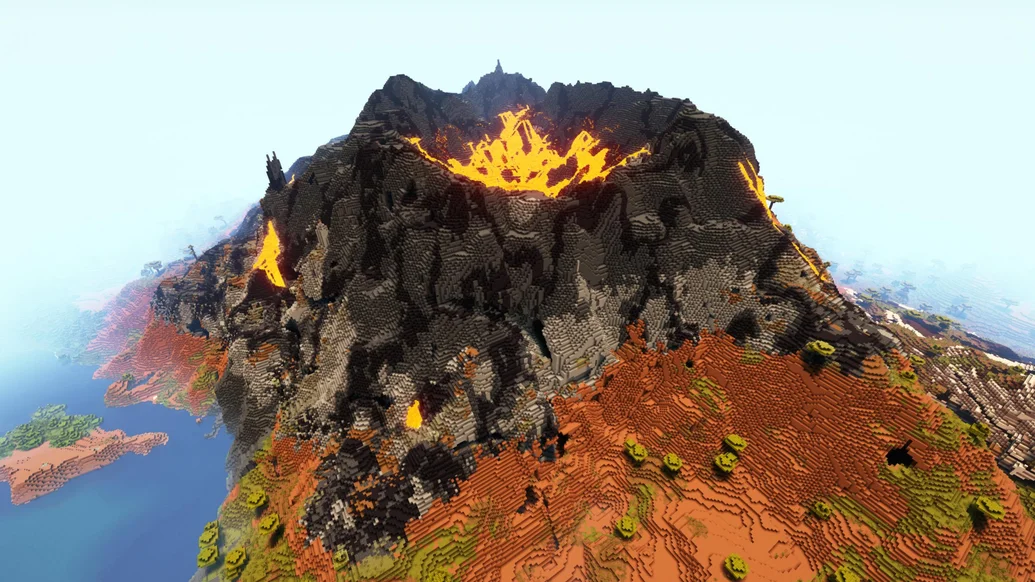
Compatibility note: Use a fresh world for the cleanest generation. Existing chunks will not be remade automatically.
24. Tectonic
Typical loaders: Data pack plus Fabric, Forge, and NeoForge builds
Tectonic changes the shape and scale of terrain, emphasizing sweeping mountain systems, deeper landforms, and more natural continental layouts. It can be combined with selected biome projects when their compatibility instructions explicitly allow it.
Compatibility note: Do not stack multiple world generators blindly; worldgen conflicts may load but still produce ugly or unstable terrain.
25. Biomes O’ Plenty
Typical loaders: Fabric, Forge, and NeoForge
Biomes O’ Plenty expands the Overworld, Nether, and End with new landscapes, plants, trees, flowers, and building materials. It is a classic choice for players who want exploration to reward them with blocks they cannot find in vanilla.
Compatibility note: Recent versions require GlitchCore, and Fabric builds also require Fabric API.
26. Regions Unexplored
Typical loaders: Fabric, Forge, and NeoForge
Regions Unexplored overhauls the Overworld and Nether with dozens of biomes and a large set of plants, blocks, and trees. Its visual identity is stronger than vanilla-only generators, making it a good choice for builders who want exploration and material collection tied together.
Compatibility note: The official project describes 64 new biomes. Confirm TerraBlender and other dependencies for your version.
27. YUNG’s Better Dungeons
Typical loaders: Fabric, Forge, and NeoForge
YUNG’s Better Dungeons replaces the tiny vanilla dungeon experience with larger, themed underground layouts. Catacombs, forts, and spider caves make early exploration more memorable while still using recognizable Minecraft combat and loot ideas.
Compatibility note: It requires YUNG’s API. Other YUNG projects upgrade mineshafts, temples, strongholds, monuments, and more.
28. When Dungeons Arise
Typical loaders: Fabric, Forge, and NeoForge
When Dungeons Arise fills the world with towers, palaces, airships, temples, and large combat-focused landmarks. The structures are impressive and give multiplayer groups clear expedition targets, but they can change progression by offering substantial loot.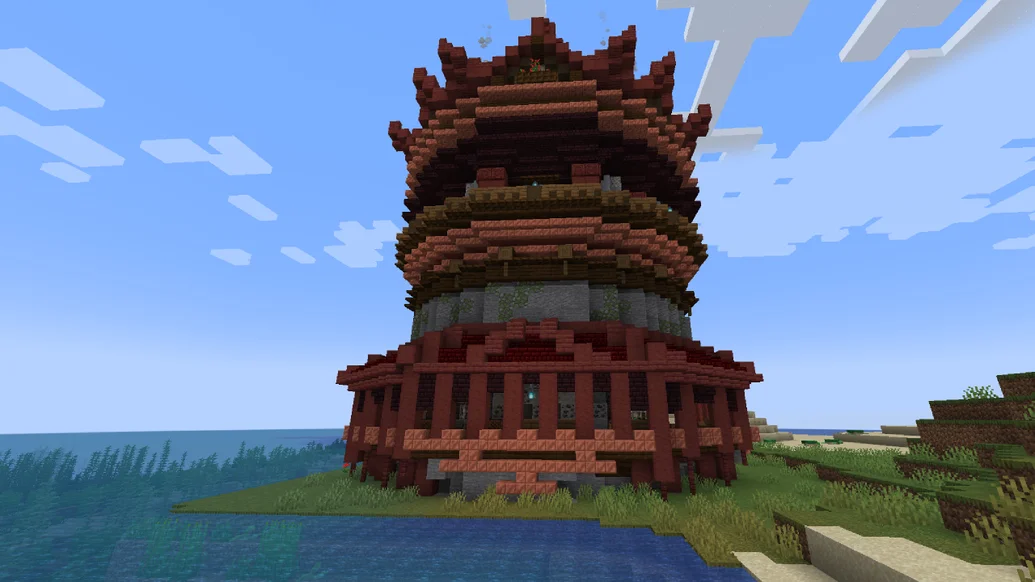
Compatibility note: Review generation frequency and loot balance before adding it to a carefully tuned survival server.
29. The Twilight Forest
Typical loaders: Forge and NeoForge
The Twilight Forest adds a dimension with its own biomes, dungeons, bosses, items, and progression path. It feels closer to a campaign inside Minecraft than a simple collection of extra blocks, making it a strong choice for players who want guided exploration.
Compatibility note: Development versions do not always target the newest Minecraft release immediately. Install the game version recommended by the project.
30. BetterNether
Typical loaders: Primarily Fabric
BetterNether expands the Nether with additional biomes, plants, structures, materials, and building blocks. It gives players reasons to explore beyond fortresses and bastions and makes long Nether routes feel less visually repetitive.
Compatibility note: BetterNether depends on BCLib. Keep the library and mod on compatible versions.
Best Adventure, Technology, Magic, and Gameplay Mods
These projects can reshape progression more than any performance mod. Choose a few that support the same Minecraft version and loader instead of forcing every famous mod into one unstable pack.
31. BetterEnd
Typical loaders: Primarily Fabric
BetterEnd replaces the empty outer islands with atmospheric biomes, plants, structures, resources, sounds, and building sets. It makes post-dragon exploration feel like a genuine late-game chapter rather than a repeated search for End Cities.
Compatibility note: BetterEnd requires BCLib. Start a new world or explore untouched End chunks after installing.
32. Alex’s Caves
Typical loaders: Forge and NeoForge
Alex’s Caves adds large cave biomes with distinct hazards, mobs, resources, and equipment. Each area has a strong theme and mechanics of its own, rewarding preparation and repeated underground expeditions.
Compatibility note: This content mod is commonly used on Minecraft 1.20.1-era packs. Do not assume a 26.2 file exists without checking.
33. Alex’s Mobs
Typical loaders: Forge and NeoForge
Alex’s Mobs adds a wide range of real and fictional creatures, each designed with behaviors, drops, or interactions rather than serving as simple decoration. The animals make biomes feel more alive and create new reasons to travel.
Compatibility note: It requires Citadel. Match both files to the exact same Minecraft branch.
34. Naturalist
Typical loaders: Fabric, Forge, and NeoForge
Naturalist adds animals with detailed movement and behavior while keeping a style that fits ordinary Minecraft. It suits players who want richer wildlife but do not want every creature to introduce a large combat or crafting system.
Compatibility note: Check whether your chosen biome and food mods provide direct integrations.
35. Create
Typical loaders: Forge and NeoForge; community Fabric ports vary
Create builds automation around gears, shafts, belts, moving structures, trains, and physical-looking machines. Instead of hiding every process inside a menu, it encourages players to design working production lines they can watch and improve.
Compatibility note: Create has a large addon ecosystem, but every addon must match the exact Create and Minecraft versions.
36. Mekanism
Typical loaders: NeoForge, with Forge support on older branches
Mekanism is a deep technology mod covering energy, factories, digital mining, gases, chemicals, jetpacks, and multi-stage ore processing. It works best for players who enjoy long progression chains and highly automated late-game bases.
Compatibility note: Use JEI or EMI because many machines and chemical recipes are difficult to learn from memory.
37. Applied Energistics 2
Typical loaders: Fabric and NeoForge
Applied Energistics 2 turns storage into a network built from drives, terminals, cables, channels, and crafting processors. Its automation is extremely capable, but the system expects players to learn resource generation and network planning.
Compatibility note: AE2 is better for players who enjoy engineering constraints; Refined Storage is usually easier to approach.
38. Refined Storage
Typical loaders: Fabric, Forge, and NeoForge
Refined Storage provides searchable digital storage, external connections, fluid handling, wireless access, and autocrafting with a relatively direct learning curve. It is a practical centerpiece for packs that add thousands of items.
Compatibility note: Never remove a storage mod before safely exporting important items from its disks or network.
39. Farmer’s Delight
Typical loaders: Forge and NeoForge; separate Fabric ports exist
Farmer’s Delight expands food preparation with knives, cutting boards, cooking pots, meals, crops, and useful kitchen blocks. It makes farming more rewarding without turning the game into a completely separate farming simulator.
Compatibility note: Many addons connect it with biome and creature mods. Install only addons maintained for your version.
40. Cobblemon
Typical loaders: Fabric and NeoForge
Cobblemon brings collectible creatures, capture mechanics, battles, training, and multiplayer-friendly progression into Minecraft while keeping a block-world presentation. It is large enough to become the main purpose of a server or survival world.
Compatibility note: Server and client mod lists must match. Check required libraries and recommended datapacks on the official project page.
Best Magic, Building, and Storage Mods
The final ten cover alternate player abilities, spell systems, custom tools, creative building, schematics, decoration, and portable storage.
41. Origins
Typical loaders: Primarily Fabric
Origins lets players choose a background that grants special abilities and weaknesses. Water-sensitive Enderian-style play, flight-focused origins, and many community expansions create distinct roles for solo challenges and SMP groups.
Compatibility note: Origins-based servers need careful balance because extra origin packs can vary widely in power.
42. Ars Nouveau
Typical loaders: Forge and NeoForge
Ars Nouveau allows players to assemble spell effects into custom combinations, create magical automation, summon helpers, and develop a spell-focused base. The flexible glyph system makes experimentation more important than collecting one fixed list of spells.
Compatibility note: Use the in-game documentation and a recipe viewer; required libraries vary by release.
43. Iron’s Spells ’n Spellbooks
Typical loaders: Forge and NeoForge
Iron’s Spells ’n Spellbooks adds spell schools, equipment, scrolls, enemies, structures, and combat-focused casting. It is a better fit than Ars Nouveau when you want loot-driven RPG battles rather than a programmable magic system.
Compatibility note: Balance its damage and loot settings when mixing it with other combat overhauls.
44. Tinkers’ Construct
Typical loaders: Forge and NeoForge
Tinkers’ Construct replaces ordinary tool progression with parts, materials, modifiers, casting, and smeltery systems. Players can build tools for specific jobs instead of treating every pickaxe or sword as the same item with different enchantments.
Compatibility note: Mantle is required. Current feature sets differ between Minecraft branches, so older tutorials may not match your build.
45. WorldEdit
Typical loaders: Fabric, Forge, and NeoForge
WorldEdit provides selections, brushes, copying, pasting, replacement commands, schematics, and powerful terrain tools. It is ideal for creative builders, map makers, and server staff who need to edit thousands of blocks safely.
Compatibility note: Practice on a copy of the world and learn undo limits before running large commands.
46. Axiom
Typical loaders: Fabric
Axiom combines in-world building tools with an editor interface for sculpting terrain, transforming selections, painting materials, and refining large scenes. It is more visual than command-heavy building workflows and suits serious creative projects.
Compatibility note: Axiom is meant for Creative mode and may require a supported server setup for multiplayer editing.
47. Litematica
Typical loaders: Fabric
Litematica displays a holographic schematic inside the world, shows missing or incorrect blocks, and helps builders reproduce complex farms and structures accurately. It is valuable for Survival construction because it guides placement without automatically building the project.
Compatibility note: Litematica requires MaLiLib. Some servers restrict schematic-assisted features, so follow their rules.
48. Chipped
Typical loaders: Fabric, Forge, and NeoForge
Chipped adds themed workstations that turn familiar blocks into a huge range of decorative patterns. Builders gain far more choices for floors, walls, trim, roofs, and detailed interiors without learning a complex progression system.
Compatibility note: It has multiple library dependencies. Verify Athena, Resourceful Lib, and connected-texture requirements for your release.
49. Sophisticated Backpacks
Typical loaders: Forge and NeoForge
Sophisticated Backpacks adds tiered bags, filters, feeding, pickup, compression, tool swapping, and other upgrades. The system grows with progression and works well in exploration-heavy or technology packs where normal inventory space disappears quickly.
Compatibility note: Sophisticated Core is required. Server owners should review upgrade balance and slot limits.
50. Storage Drawers
Typical loaders: Fabric, Forge, and NeoForge
Storage Drawers stores large quantities of individual item types in compact blocks whose fronts show what they contain. Controllers and upgrades make it ideal for farms, quarries, and machine rooms producing thousands of repeated resources.
Compatibility note: It complements digital storage rather than replacing it: use drawers for bulk materials and AE2 or Refined Storage for everything else.
How to Choose and Install Minecraft Mods Safely
Mods on this list are designed for Minecraft: Java Edition. Bedrock Edition uses add-ons and Marketplace content rather than Java JAR mods. A Java mod cannot be placed into a Bedrock world.
- Choose one Minecraft version. Do this before downloading anything. Minecraft 26.2 is current, while 1.21.1 and 1.20.1 still have broader support for many large content mods.
- Choose one loader. Fabric is popular for lightweight client mods; NeoForge supports many modern content-heavy projects; Forge remains important for older mod branches. Quilt runs selected Fabric-compatible projects but is not supported by every mod.
- Use official project pages. Download from Modrinth, CurseForge, or a developer’s verified repository. Avoid reupload sites.
- Install dependencies. Libraries such as Fabric API, Balm, BCLib, Citadel, Moonlight Library, YUNG’s API, Mantle, MaLiLib, GlitchCore, and Sophisticated Core are required by specific entries above.
- Back up the world. Copy the complete save folder before adding, updating, or removing world-generation, storage, dimension, or technology mods.
- Test in small batches. Launch after every few mods. A 100-mod pack is much easier to troubleshoot when you know which recent addition caused the crash.
Light setups often work with 4–6 GB, many medium packs use 6–8 GB, and large packs with shaders may need 8–10 GB. Do not give Minecraft all your system memory. Follow our Minecraft RAM allocation guide for the official launcher and CurseForge steps.
Common Reasons Minecraft Mods Do Not Work
- The mod targets a different Minecraft release.
- The file is for Fabric but the profile launches NeoForge, Forge, or vanilla.
- A required library is missing or on the wrong version.
- Two mods replace the same renderer, menu, recipe system, or world generator.
- The server has a content mod that the client does not—or the reverse.
- An old config remains after a major upgrade.
- Java or the launcher profile is incorrect for the Minecraft branch.
- The pack does not have enough memory, or too much memory has been allocated.
If a world-generation experiment goes wrong, restore the backup instead of deleting random files. Our guide to resetting Minecraft chunks explains why chunk editing requires care. For multiplayer, also compare your hardware needs with our Minecraft server hosting guide for small groups.
Frequently Asked Questions
What is the best Minecraft mod overall?
Sodium is the best first mod for many Java players because it improves performance without changing survival gameplay. If you want new content rather than FPS, start with Terralith, Create, or Cobblemon.
What is the best Minecraft version for mods in 2026?
Minecraft 26.2 is the latest stable Java release, but 1.21.1 and 1.20.1 currently offer broader compatibility with many large content mods. Choose the version that supports the specific group of mods you want.
Is Fabric or NeoForge better?
Neither is universally better. Fabric is strong for lightweight client and performance mods, while NeoForge has extensive support among modern technology, magic, storage, and adventure mods. Project compatibility should decide your loader.
Can Minecraft Java mods work on Bedrock Edition?
No. Java Edition mods use loaders and JAR files that Bedrock cannot run. Bedrock players need add-ons built specifically for Bedrock Edition.
Can I use all 50 mods together?
No single setup should assume all 50 are compatible. They span different Minecraft versions and loaders, and several overhaul the same systems. Treat this as a menu of options and build around one version and loader.
Will adding mods damage an existing world?
Small client mods are generally low risk, but content, storage, dimension, and world-generation mods can affect save data. Back up the complete world before changing the mod list, and never remove a mod while important items or blocks from it remain in use.
Final Recommendations
For a lightweight vanilla-plus setup, combine Sodium, Lithium, FerriteCore, ImmediatelyFast, Jade, AppleSkin, Mouse Tweaks, and Xaero’s Minimap. Add Iris only if you want shaders.
For exploration, build around Terralith or Biomes O’ Plenty, then add YUNG’s Better Dungeons, When Dungeons Arise, Nature’s Compass, and Waystones. For a technology pack, choose Create, Mekanism, AE2 or Refined Storage, Storage Drawers, and a recipe viewer.
The most stable modpack is not the one with the longest list. It is the one where every file targets the same Minecraft version and loader, every dependency is present, and the world is backed up before major changes. Browse more tested tutorials in our Minecraft guides.

Abhigyan identifies himself as a tech geek, gaming cognoscenti, and also a connoisseur of music. Unidentified and mysterious phenomena never fail to gather his undivided attention. When not reading about bizarre and perplexing entities across the Universe, he can often be found cheering for his favorite teams in Football.