
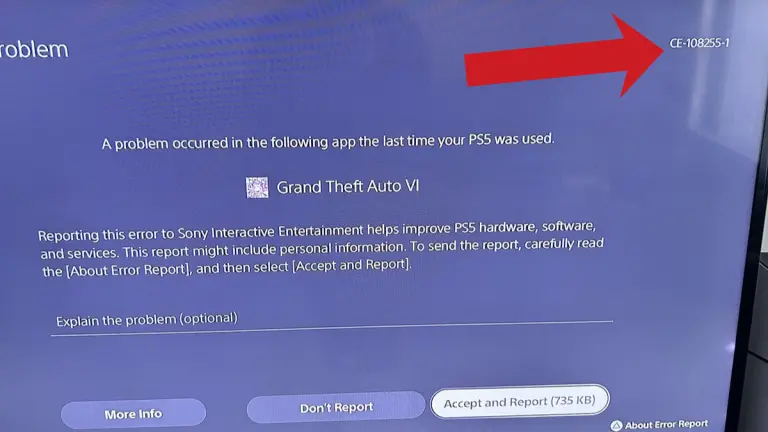

Quick answer: CE-108255-1 is a general PS5 crash code that Sony describes as an error with the game or application. In GTA 6 it can close the game at any point, from the opening cutscene to hours into Chapter 1. Sony’s official fix is to update the game (and your PS5 system software), and if it keeps happening, contact PlayStation Support. Players also try a restart, clearing the cache, rebuilding the database and reinstalling, but no single fix works for everyone yet, and Rockstar hasn’t released a crash patch as of November 22, 2026. We’ll update this guide when one arrives.
Last updated: November 22, 2026
What does CE-108255-1 mean in GTA 6?
Sony’s own error code page lists CE-108255-1 as “an error occurred with the game/application.” It is not specific to GTA 6: it’s the code a PS5 shows whenever a game crashes back to the home screen. Since launch on November 19, Beebom, GamesRadar+, Dexerto, PC Guide and Notebookcheck have all reported GTA 6 players hitting it on every PS5 model, including the original PS5, the Slim, the Digital Edition and the PS5 Pro.
When it happens varies a lot between reports:
- During the opening cutscene or Lucia’s prison prologue, seconds after starting.
- In Jason’s early boat section in Chapter 1.
- After several minutes or a few missions of normal play, with the game dropping to the PS5 home screen.
- One player on Dexerto reports a crash every time they use the plunger in Pipework (single report).
Some players have guessed it’s a hardware or cooling fault, but there’s no evidence for that yet, so don’t send your console off for repair as a first step.
How to fix CE-108255-1 in GTA 6 (try in this order)
- Update GTA 6. Highlight the game on the home screen, press Options and choose Check for Update. This is Sony’s official first step for this code.
- Update the PS5 system software. Go to Settings > System > System Software > System Software Update and Settings. GTA 6 needs the November 18 system update (26.07-14.23.00) before it starts at all.
- Fully restart the console. Use Power > Restart PS5 rather than rest mode, so the game starts from a clean state.
- Clear the cache and rebuild the database. Turn the PS5 off, hold the power button until the second beep to boot into Safe Mode, connect the controller with a USB cable and choose Clear Cache and Rebuild Database. Clear the cache first, then run Rebuild Database.
- Run the game from internal storage. If GTA 6 is on an extended USB drive or an M.2 drive, try moving it to the console’s internal SSD (Settings > Storage). One player who did this reported fewer crashes, so it’s worth a try but not proven.
- Reinstall. Delete GTA 6 from Settings > Storage and download it again. Your saves live separately, but upload them to cloud storage first if you have PlayStation Plus to be safe.
- Contact PlayStation Support. Sony’s page says to use PlayStation Repairs if updating doesn’t help. Only consider this if the crash also happens in other games.
Before any of these, make a manual save in a fresh slot. Some players report losing progress or loading an older autosave after a crash, so saving often is the best protection until Rockstar patches the game.

Other GTA 6 PS5 error codes and fixes
CE-108255-1 is the code most outlets have covered, but players report a few others. The meanings below are from Sony’s PS5 error code pages.
| Error code | What Sony says it means | When it shows up in GTA 6 | Fix to try |
|---|---|---|---|
| CE-108255-1 | An error occurred with the game/application | Crash to home screen at any point | Update the game and system, then the steps above |
| CE-107891-6 | Content isn’t installing properly | During install or the first launch (reported by UNILAD Tech) | Settings > Storage, delete GTA 6, reinstall; try again later if it repeats |
| CE-100005-6 | The game or application can’t load | Install freezes or the game won’t load | Delete and reinstall; for a disc copy, clean the disc from the centre outward first |
| CE-108262-9 | Error reading system software or application data | Crash seconds after launch, then a storage repair prompt (fan reports only) | Update system software, reinstall, then Clear Cache and Rebuild Database in Safe Mode |
| CE-107622-8 / CE-100095-5 | The application failed to launch | Game won’t start | Restart, update, then Settings > Users and Accounts > Other > Restore Licenses |
| CE-109245-1 / NP-104291-7 | The license can’t be confirmed | “You can’t play this game” on a bought copy | Sign in with the account that bought it, check PSN status, Restore Licenses |
Rockstar’s own support article for CE-100005-6 covers all its PS5 games and points to Sony’s fix. For crashes that aren’t tied to a code, such as freezes and stuck loading screens, see our full GTA 6 launch problems and fixes guide.
Is GTA 6 crashing on Xbox too?
Yes, but without a matching code. Xbox Series X|S players describe freezes and returns to the dashboard after anything from a few minutes to around two hours. The steps that help most often are the same in spirit: fully close the game instead of using Quick Resume, check for game and console updates, do a full power cycle (hold the power button, unplug for about two minutes), and keep the game on the internal SSD or an expansion card. None of these is an official Rockstar fix yet.
Has Rockstar fixed the GTA 6 crashes?
Not yet. As of November 22, 2026, the newest GTA 6 update is still the pre-launch title update 1.002.001 (about 600 MB on PS5), and Rockstar hasn’t posted patch notes or a statement about CE-108255-1. Its GTA VI error troubleshooting article lists no codes and links to Sony’s and Xbox’s error pages instead, and Rockstar’s service status page shows no GTA VI problem. Players say support tickets are being logged and redirected to PlayStation. Posts claiming a dated fix patch are unverified. We track every update in our GTA 6 patch notes and will add the fix here as soon as Rockstar confirms one.
FAQ
Will reinstalling GTA 6 delete my save?
Deleting the game data from Storage doesn’t normally remove saved data, which is stored separately. Back it up to PlayStation Plus cloud storage or a USB drive first if you want to be certain.
Is CE-108255-1 a sign my PS5 is broken?
Not on its own. It’s a generic game crash code and it’s being reported on every PS5 model. If other games crash the same way, then contact PlayStation Support.
Does the PS5 Pro avoid the crash?
No. Reports include PS5 Pro owners, so upgrading your console isn’t a guaranteed fix.
When will Rockstar patch GTA 6 crashes?
Rockstar hasn’t announced a date. Keep automatic updates on so the patch installs as soon as it’s out.
More GTA 6 guides: Launch problems and fixes · Patch notes · How to save · Best settings · GTA 6 file size
Grand Theft Auto VI is developed and published by Rockstar Games. Stealthy Gaming is not affiliated with Rockstar Games or Take-Two Interactive.

Hi, I’m Ankit Kumar, the founder of StealthyGaming. I handle everything from SEO to researching and writing gaming articles. I’m passionate about helping fellow gamers stay updated with the latest tips, guides, and news. When I’m not optimizing content, I’m probably testing out new games or digging into strategies to make my articles as helpful and engaging as possible.
We label leaks and unconfirmed details and update this guide as Rockstar confirms more. How we research and verify our guides.