


A small room does not have to limit your gaming setup. With the right desk proportions, wall storage, lighting, and layout, even a compact office can become a comfortable place to game, work, study, or create content. The key is to make every piece of furniture earn its space.
These gaming office ideas for small spaces explore colorful RGB setups, minimalist desks, warm wood finishes, futuristic lighting, themed backdrops, and natural-light workstations.
Each idea can be adapted to a bedroom, spare room, apartment office, or small corner without making the space feel overcrowded.
14 Small-Space Gaming Office Ideas at a Glance
- Electric blue gaming office with neon accents
- Minimal gray and white gaming workspace
- Warm white office with fantasy-inspired decor
- Pastel glow gaming desk
- Natural wood gaming office
- Amber and blue setup with a wood backdrop
- Bright blue and white gaming studio
- Warm neutral setup with dark accents
- Red and white futuristic gaming office
- Earth-toned minimalist gaming workspace
- Dark gaming office with an amber glow
- Black and gold modern gaming setup
- Green and white themed gaming office
- Gaming desk positioned to use natural light
How to Plan a Gaming Office in a Small Space
| Area | Space-Saving Choice | Practical Tip |
|---|---|---|
| Desk | Compact straight or corner desk | Measure depth before buying |
| Monitors | Single screen or monitor arm | Keep the main screen centered |
| Storage | Floating shelves and pegboards | Use vertical wall space |
| Lighting | Wall or monitor lighting | Avoid bulky floor lamps |
| Decor | One focused backdrop | Leave some wall space open |
14 Unique Gaming Office Ideas for Small Spaces
1. Electric Blue Gaming Office With Neon Accents
Give a compact gaming office a strong focal point with electric blue lighting against a darker wall.
A narrow black desk, single monitor, and blue LED glow can create plenty of atmosphere without requiring much furniture. Run lighting behind the monitor or underneath the desktop instead of taking up valuable surface area with decorative lamps.
Add one or two blue accessories to repeat the color, but let the rest of the room stay neutral. In a small office, limiting the palette helps the setup feel intentional rather than visually crowded.

Amazon Find: Blue LED Strip Lights
LED strips can add a blue glow behind a monitor or desk while taking up virtually no usable floor or desktop space.

2. Keep It Minimal With Gray and White
A gray-and-white color scheme can make a small gaming office feel brighter and more open. Choose a compact white or light-gray desk and pair it with black equipment for contrast.
Keep the wall behind the monitor mostly uncluttered, perhaps adding one framed print or a slim shelf. Cable management matters especially in this style because loose cords are more noticeable against a clean backdrop.
If the office doubles as a study or work area, the neutral palette also makes it easier to transition from gaming to everyday tasks.

3. Create a Warm White Fantasy-Inspired Office
Gaming spaces do not always need dark walls and bright RGB lighting. A warm white room can create a softer fantasy-inspired workstation using cream walls, warm wood, subtle artwork, and gentle accent lighting.
Keep the desk compact and use a small floating shelf for a few themed collectibles. A warm desk lamp can provide practical lighting during non-gaming hours, while a discreet backlight adds atmosphere when the main room lights are turned down.
This approach works especially well when the gaming office shares space with a bedroom or living area.

Amazon Find: Warm Desk Lamp
A compact desk lamp can provide useful task lighting while keeping a warm, cozy look that works beyond gaming sessions.

4. Try a Pastel Glow Gaming Desk
Pastel colors can make a gaming office feel fresh without relying on the typical dark setup.
Start with a white desk and add lavender, soft pink, pale blue, or mint through lighting and small accessories. A compact monitor setup keeps the workstation visually light, while a wall-mounted shelf provides room for headphones and small decorations.
Use one pastel color as the dominant accent and a second shade sparingly. This prevents a small office from feeling overly busy while still giving the setup a distinct personality.

5. Bring in Natural Wood and Warm Lighting
Natural wood can soften the technical appearance of a gaming office and make a compact workspace feel more connected to the rest of the home. Use a wood desktop with black or dark-gray equipment, then add warm lighting behind the monitor.
A small plant, cork board, or framed artwork can add texture without consuming much space. If a full wood desk is outside the budget, consider reusing a sturdy existing tabletop and improving its appearance with better cable management and coordinated accessories.

Amazon Find: Wood Floating Shelves
Wood shelves can add warmth while providing vertical storage for small decor, books, controllers, or headphones.

6. Combine Amber and Blue With a Wood Panel Backdrop
For a more layered look, combine warm amber lighting with cooler blue accents. A wood slat or wood-look wall panel behind the desk creates a textured backdrop without requiring additional furniture. Keep the desk narrow and place the monitor in the center so the backdrop remains visible around it.
Amber lighting can come from a small desk lamp or warm backlight, while blue LEDs provide the gaming atmosphere. The contrast gives a small office more visual depth without adding clutter to the floor.

7. Brighten a Small Office With Blue and White
Blue and white make a useful combination when a small gaming office needs to feel brighter. Use white walls and furniture as the base, then bring in blue through monitor lighting, a desk mat, artwork, or a single accent chair.
Keep the desk surface simple so the color feels deliberate. If there is a window, position the workstation so daylight can brighten the room without creating direct glare on the monitor.
A compact rolling drawer unit can provide storage without permanently consuming floor space.

Amazon Find: Compact Rolling Storage Cart
A slim rolling cart can hold controllers, headphones, cables, notebooks, and other accessories while remaining easy to move when floor space is needed.

8. Use Warm Neutrals With Dark Accents
Warm beige, taupe, cream, and brown can make a gaming office feel more like a comfortable home workspace. Add dark accents through the desk, monitor, chair, and a few accessories.
Instead of filling the room with RGB lights, use one subtle backlight or a warm lamp to keep the atmosphere relaxed.
This style is particularly useful when the office is visible from another room because it blends more naturally with traditional or contemporary home decor.

9. Add a Red and White Futuristic Accent
Red can create a strong gaming-office identity when it is used selectively. Start with a white or light-gray desk and walls, then introduce red through LED lighting, a desk mat, chair details, or one piece of wall art. Geometric lines or angular accessories can add a futuristic feel.
In a small office, avoid using red on every surface. One concentrated red accent behind the monitor is usually enough to make the workstation feel energetic without overwhelming the room.

10. Build an Earth-Toned Minimalist Gaming Workspace
For a setup that feels calmer than a traditional gaming room, use earthy shades such as sand, olive, warm brown, charcoal, and cream. A wood desk paired with a dark monitor and neutral chair provides the foundation.
Add a small plant and one or two natural-texture accessories for warmth. Keep gaming equipment organized beneath or behind the desk so the desktop stays open.
This setup is a strong choice for a small home office that needs to function as a regular workspace during the day.

11. Go Dark With an Amber Glow
A dark gaming office can feel dramatic even when the room itself is small. Use charcoal or deep gray on the main wall and pair it with black furniture. Then introduce warm amber lighting behind the monitor or under a shelf.
The warm glow prevents the dark palette from feeling flat while giving the setup a more sophisticated appearance.
If the room has limited natural light, keep the ceiling and one or more surrounding walls lighter so the entire space does not become visually heavy.

Amazon Find: Monitor Backlight
A compact monitor backlight can create an amber halo behind the screen without requiring another lamp on the limited desk surface.

12. Try Black and Gold With Modern Wall Panels
Black and gold can give a small gaming office a polished, modern appearance. Use black as the main furniture and wall color, then introduce gold through trim, artwork frames, lighting details, or small accessories.
A simple geometric or slatted wall treatment behind the desk can add texture without requiring extra floor space. Keep the gold accents limited to a few areas so the room remains contemporary rather than overly ornate. This works particularly well with a compact black desk and a single large monitor.

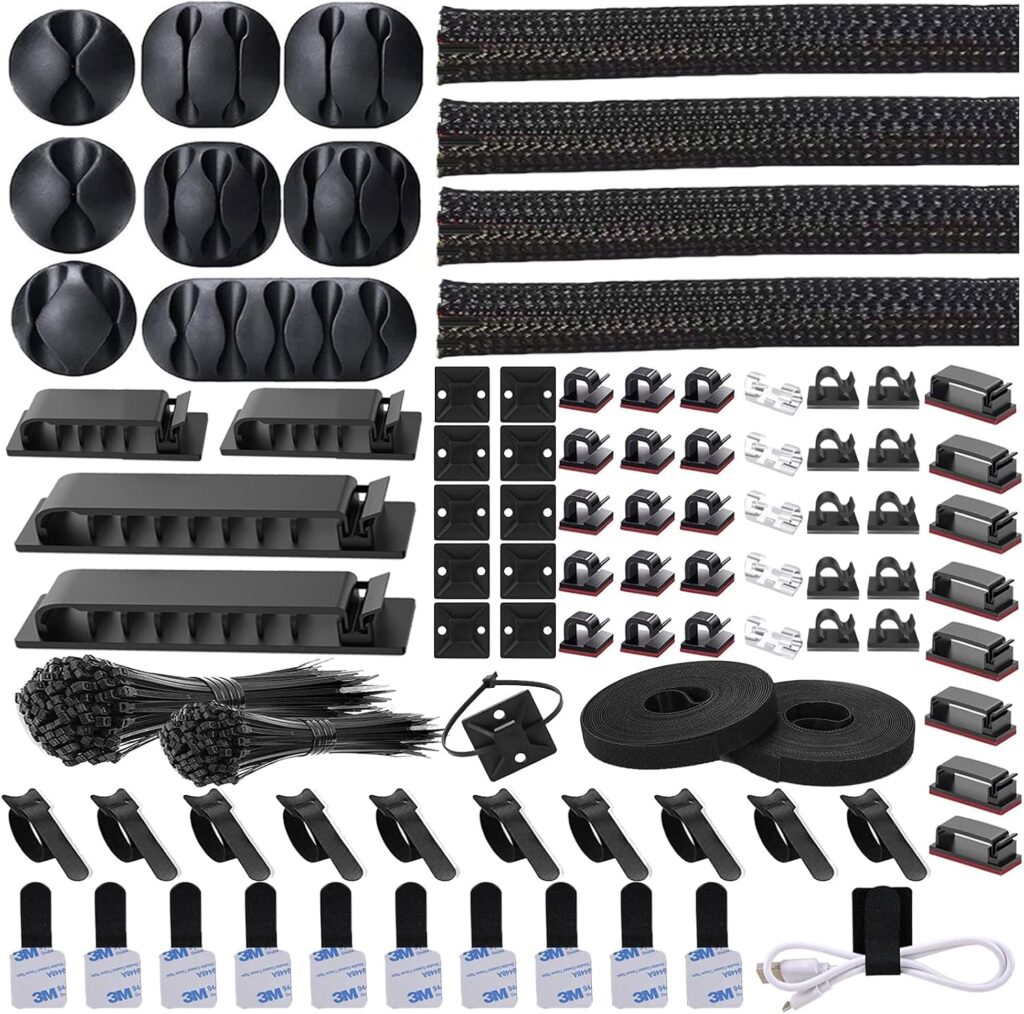
Amazon Find: Cable Management Kit
Cable clips, sleeves, and organizers help preserve the clean lines of a small gaming office by keeping loose cords grouped and routed away from the floor.
13. Use Green and White for a Fresh Themed Setup
Green and white can create a distinctive gaming office without relying on an overly dark palette. Use white walls and a light desk as the foundation, then add green through LED lighting, plants, artwork, or a desk mat.
If the gamer has a favorite anime, game, or fictional world, a few carefully chosen references can personalize the setup without covering every wall.
Floating shelves are useful here because they allow collectibles to become part of the decor while keeping the desk surface clear.

14. Position the Gaming Desk Near Natural Light
A window can become an advantage in a small gaming office when the desk is positioned thoughtfully. Place the workstation near natural light while avoiding a direct line that creates distracting screen glare. Use curtains or blinds to control strong daylight when necessary.
Keep the rest of the setup simple so the window remains part of the room rather than something hidden behind furniture.
A light wood or white desk can make the area feel brighter, while a few plants or minimal wall shelves add personality without blocking the available light.

Small Gaming Office Shopping Checklist
Essentials:
- Compact desk that fits the available wall and chair clearance
- Comfortable chair sized for the room
- Monitor and appropriate stand or arm
- Keyboard and mouse
- Practical task lighting
- Cable clips or cable sleeves
- Storage for controllers, headphones, and accessories
Optional extras:
- LED backlighting
- Floating shelves
- Acoustic or decorative wall panels
- Small plants
- Framed gaming artwork
- Controller and headset stand
- Rolling storage cart
Before purchasing anything, measure the full workstation area, including the chair when pulled away from the desk. In a small office, a few extra inches of desk depth can make a surprising difference. Reusing a desk you already own and upgrading its lighting, storage, and cable organization can also be a practical budget-friendly approach.
Common Mistakes in Small Gaming Offices
- Choosing an oversized desk: Measure the wall and chair clearance before buying.
- Using every available wall: Leave some open space so the office does not feel boxed in.
- Ignoring cable management: Loose cords quickly make a small setup look messier.
- Blocking natural light: Position monitors carefully so windows do not create distracting glare.
- Overusing RGB lighting: Choose one or two main colors instead of lighting every surface.
- Forgetting storage: Controllers, headphones, and cables need dedicated homes.
- Blocking ventilation: Keep computers and other electronics positioned according to their ventilation requirements.
Frequently Asked Questions
How can I fit a gaming setup into a very small office?
Start with the smallest desk that comfortably fits the monitor, keyboard, and mouse. Use wall-mounted shelves for storage, keep the desktop uncluttered, and consider a monitor arm if compatible with your equipment. A narrow rolling storage cart can also replace a larger cabinet.
What color makes a small gaming room look bigger?
Light neutrals such as white, soft gray, cream, and pale beige can make a compact room feel more open. You can still use dark gaming furniture or colorful LEDs as accents. Keeping larger surfaces light while concentrating darker colors around the desk creates contrast without making the whole room feel heavy.
Are RGB lights a good idea for a small gaming office?
Yes, as long as they are used selectively. Behind-monitor lighting, under-desk strips, or small wall lights can create atmosphere without consuming floor space. Choose a limited color palette and make sure the room also has practical lighting for reading, working, or other activities.
How do I make a small gaming office look less cluttered?
Keep frequently used equipment on the desk and move everything else into drawers, shelves, or organizers. Route cables along the rear of the desk, use vertical storage, and avoid covering every wall with decor. One strong backdrop generally looks cleaner than many unrelated decorative pieces.
Can a small gaming office also be used as a regular home office?
Absolutely. Choose a desk with enough room for a notebook or laptop, use comfortable seating, and include practical task lighting. Neutral furniture makes the transition easier, while removable gaming decor and adjustable lighting can provide the gaming atmosphere when desired.
Recommended Finds
Compact gaming desks — Useful when every inch matters and you need enough surface for essential equipment without overwhelming the room.
Monitor arms — A practical way to free desk surface and create more flexibility around the monitor.
Under-desk cable management — Helps keep power and accessory cables grouped beneath the workstation instead of spreading across the floor.
Final Thoughts
The best gaming office ideas for small spaces start with the layout rather than the decor. Measure the desk area, plan the chair clearance, decide where the cables will run, and use the walls for storage whenever possible. Once those practical pieces are working, lighting and personal decor can give the office its gaming identity.
You do not need a huge room to create a memorable gaming workspace. A compact desk, organized equipment, one well-designed backdrop, and lighting that suits your style can turn even an awkward corner into a comfortable gaming office.
