


A great gaming desk setup should look good, keep equipment organized, and make it easy to switch between gaming, studying, working, or creating content. The right combination of desk layout, lighting, monitor placement, storage, and personal details can make even a small corner feel like a dedicated gaming station.
These gaming desk setup ideas cover a range of styles, from clean minimalist workstations and warm wood desks to colorful RGB battlestations, dual-monitor layouts, console corners, and compact bedroom setups. Use the ideas as a starting point and adjust the colors, equipment, and storage to fit your room.
16 Gaming Desk Setup Ideas at a Glance
- Immersive RGB gaming battlestation
- Warm wood and technology setup
- Minimalist black-and-white desk
- Cozy bedroom gaming corner
- Neon cyberpunk gaming station
- Geometric lighting backdrop
- Cosmic-themed gaming desk
- Racing-inspired command center
- Compact professional gaming workspace
- Floating-shelf gaming setup
- Acoustic panel backdrop
- Retro-modern gaming desk
- Content creator workstation
- Dual-monitor productivity setup
- Industrial gaming desk with storage
- Clean console gaming corner
How to Plan Your Gaming Desk Setup
| Setup Style | Best Feature | Useful Tip |
|---|---|---|
| RGB Battlestation | Ambient lighting | Keep the main furniture neutral |
| Minimalist Setup | Clean surfaces | Hide cables and limit accessories |
| Bedroom Corner | Small footprint | Use vertical storage |
| Creator Setup | Flexible workspace | Leave room for cameras or microphones |
| Console Corner | Simple TV or monitor layout | Use closed storage for controllers |
16 Best Gaming Desk Setup Ideas
1. Build an Immersive RGB Gaming Battlestation
For a classic gaming desk setup, start with a clean black desk, one or two monitors, a comfortable gaming chair, and controlled RGB lighting. Place LED lighting behind the monitors or underneath the desk rather than covering every surface. This creates a glow around the workstation without making the setup visually chaotic. A large desk mat can visually connect the keyboard and mouse area, while a small shelf nearby can display headphones, controllers, or a few favorite collectibles.

Amazon Find: RGB LED Strip Lights
Use LED strip lighting behind a monitor, desk, or shelving to create a colorful gaming backdrop while keeping the desk itself uncluttered.

2. Mix Warm Wood With Modern Gaming Gear
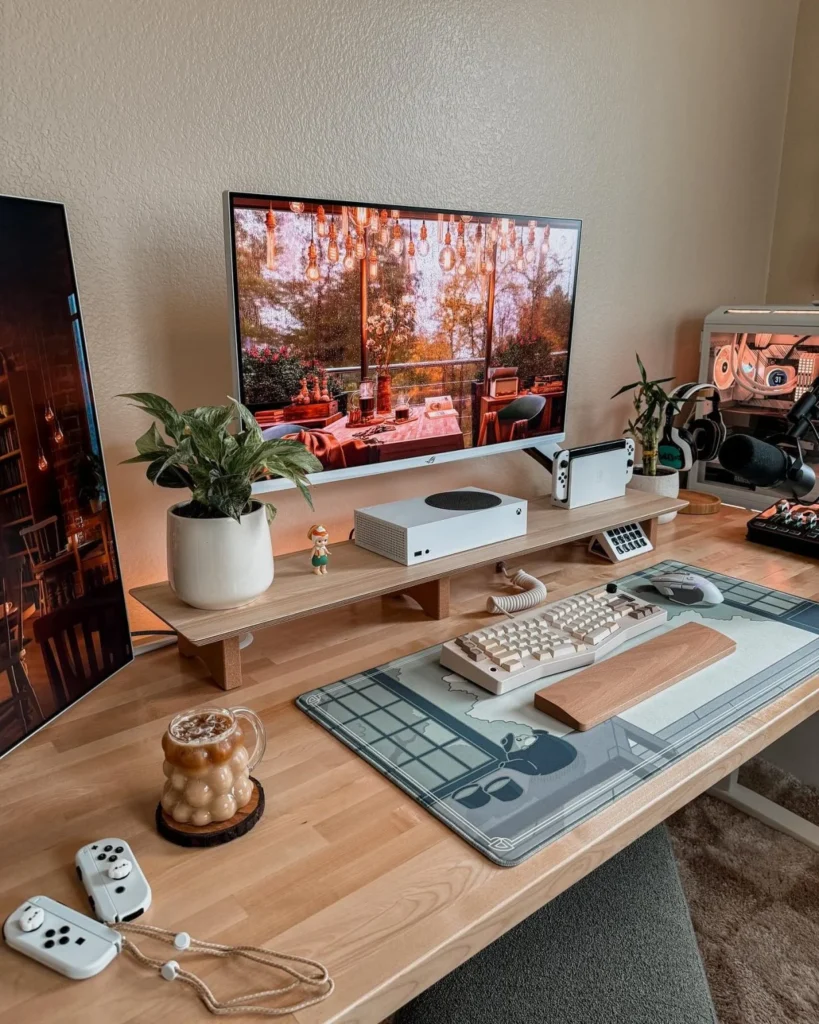
A wood desktop is a simple way to soften an otherwise technology-heavy gaming station. Pair a warm walnut or natural wood surface with black monitor stands, a dark keyboard, and restrained accent lighting. Floating shelves above the desk can hold plants, books, figures, or small gaming accessories. This approach works particularly well in bedrooms and home offices because the setup feels like part of the room instead of looking like a separate gaming booth.

3. Keep It Clean With a Minimalist Black-and-White Setup
If you prefer a calmer workstation, build your gaming desk setup around two or three colors rather than adding lots of accessories.
A white desk with black equipment creates crisp contrast, while a black desk with white walls produces a more dramatic look.
Keep the desktop mostly clear and use one monitor riser, one desk mat, and a small organizer for essential accessories. A small plant or simple framed print can add personality without disrupting the clean lines.
Amazon Find: Large Gaming Desk Mat
A large desk mat can visually organize the keyboard and mouse area while protecting the desktop surface during everyday use.

4. Create a Cozy Bedroom Gaming Corner
A gaming station does not need an entire room. A compact desk tucked into a bedroom corner can work beautifully when the layout is planned carefully.
Position the desk against the wall, use a single monitor or compact dual-monitor arrangement, and take advantage of vertical space with shelves above.
Keep the chair size proportional to the room and choose lighting that can switch between bright task lighting and softer gaming illumination.
This layout leaves the center of the bedroom open for walking and everyday activities.

5. Go Bold With a Neon Cyberpunk Gaming Station
For a more dramatic gaming desk setup, use a dark backdrop with strong neon accents.
Black furniture provides a simple foundation for purple, blue, red, or cyan lighting. Add geometric wall panels or a few futuristic prints behind the monitors to reinforce the theme.
The trick is to choose one dominant lighting combination instead of using every RGB color simultaneously.
Keep cables tucked away so the high-energy lighting remains the visual focus of the station.

Amazon Find: Geometric Wall Panels
Geometric decorative panels can give the wall behind a gaming desk more dimension and provide a structured backdrop for accent lighting.

6. Add Geometric Lighting Behind the Desk
Instead of relying only on LED strips, create a more architectural backdrop with geometric light panels or angular wall lighting.
Arrange the pieces behind the monitor so they frame the screen without competing with it.
Black-and-white furniture works well with colorful lighting, while a wood desk can make the setup feel warmer.
If the room already has plants or natural materials, repeat those elements near the desk to prevent the lighting from making the space feel too sterile.

7. Turn the Desk Into a Cosmic Gaming Escape
A cosmic theme can make a gaming corner feel immersive without requiring elaborate construction.
Use deep navy or charcoal behind the desk, then add starry artwork, subtle galaxy lighting, or a few space-inspired accessories. Keep the furniture simple so the wall provides most of the visual interest.
A monitor backlight can create a soft halo, while floating shelves can display a small rocket model, planet-themed decor, or other collectibles. This idea is especially effective in a teen bedroom.

Amazon Find: Monitor Backlight
Backlighting behind the monitor adds a soft glow around the screen and can help create a more immersive visual backdrop.

8. Create a Racing-Inspired Command Center
Racing games lend themselves naturally to a focused, cockpit-inspired setup.
Use a streamlined desk, a supportive chair, and a monitor positioned directly in front of the player. Red, orange, or blue accent lighting can suggest speed without requiring a fully themed room.
If a dedicated racing wheel is part of the setup, allow enough clearance for mounting and storage when it is not being used. Keep the surrounding furniture simple so the racing equipment remains the focal point.

9. Design a Compact Professional Gaming Nook
For apartments, bedrooms, or shared rooms, a professional-looking setup can be both compact and stylish. Choose a narrow desk with enough depth for the monitor and keyboard, then use wall-mounted storage above it.
A monitor riser can create space underneath for notebooks or accessories.
Keep the palette neutral with black, gray, white, or wood tones, and add only one or two decorative objects.
This approach is particularly useful when the desk needs to function as both a gaming station and a study or work area.

10. Use Floating Shelves to Frame the Gaming Desk
Floating shelves can turn a plain wall into a personalized gaming backdrop while keeping the desktop clear.
Install two or three shelves above the monitor, leaving enough clearance for the screen and anything that needs to be adjusted. Use the shelves for small collectibles, books, headphones, plants, or framed artwork.
Keep some empty space between objects so the arrangement does not become cluttered. Matching the shelf finish to the desk creates a more intentional visual connection.

Amazon Find: Floating Wall Shelves
Floating shelves add vertical storage for gaming collectibles and accessories without using additional floor space.

11. Add an Acoustic Panel Backdrop
Acoustic panels can give a gaming desk a studio-inspired appearance while adding texture to an otherwise plain wall. Hexagonal or rectangular panels arranged behind the monitor create a strong graphic backdrop.
Dark gray or black panels pair naturally with a modern gaming setup, while wood-toned options can warm up the room. Use them as a design feature rather than covering the entire wall.
Decorative acoustic treatment should not be confused with full soundproofing, so keep expectations realistic if noise reduction is a major goal.

12. Blend Retro Style With Modern Gaming Tech
A gaming desk can feel less futuristic by mixing current equipment with warmer vintage-inspired decor. Start with a wood desktop, then add a retro-style sign, framed arcade artwork, or classic game-inspired accessories.
Warm lighting works particularly well here, especially when paired with black or dark brown equipment. Avoid overcrowding the surface with memorabilia.
A few carefully selected pieces will make the desk feel nostalgic while allowing the modern monitor, keyboard, and PC to remain the functional center.

Amazon Find: Gaming Wall Art
Framed gaming-inspired artwork can add personality to the wall without taking up valuable desk space.

13. Build a Content Creator Gaming Workstation
If the desk needs to support streaming, video editing, or other creative work, leave more room around the main monitor.
A second display can handle chat, editing tools, or reference material while the primary screen stays focused on the game. Leave a convenient position for a microphone arm and enough space for a camera or other recording equipment if needed.
Cable management becomes especially important as equipment increases, so route cords along the back edge of the desk instead of letting them cross the work surface.

14. Maximize a Dual-Monitor Productivity Setup
Two monitors can create an efficient workstation for gaming and everyday computer use. Position the primary screen directly in front of the chair and angle the second display toward the user.
A monitor arm can help free up desk space and make the screens easier to align. Keep the keyboard and mouse centered with the primary display rather than centering them between both screens.
If the setup is in a small room, choose a desk with enough depth but avoid unnecessary width that makes movement around the room difficult.

Amazon Find: Dual Monitor Arm
A dual monitor arm can help position two screens cleanly while leaving more of the desktop available for keyboards, controllers, and other equipment.

15. Choose an Industrial Desk With Built-In Storage
A wood-and-metal desk can bring an industrial feel to a gaming room while providing practical storage.
Look for a layout with drawers, side shelving, or a nearby metal storage unit for controllers, cables, books, and accessories. Pair the furniture with muted wall colors and simple black hardware. LED lighting can add a gaming touch without overpowering the industrial materials.
This style is particularly useful for teens and adults who want the gaming station to blend with the rest of the bedroom or home office.

16. Keep It Simple With a Clean Console Gaming Corner
Not every gaming desk setup needs multiple monitors or a large PC tower. For console gaming, use a compact desk or media console with a monitor or television, one comfortable chair, and closed storage for controllers and games.
A small charging station can keep accessories organized, while one strip of backlighting adds atmosphere without taking over the room.
Choose furniture that can serve another purpose later, especially in a bedroom where space may need to change as the user’s needs evolve.

Gaming Desk Setup Shopping Checklist
Essential pieces:
- Desk with enough depth for the chosen monitor arrangement
- Comfortable, appropriately sized chair
- Monitor stand or compatible monitor arm
- Keyboard and mouse
- Desk mat
- Cable clips or cable management sleeves
- Suitable task lighting
Optional additions:
- RGB or monitor backlighting
- Floating shelves
- Acoustic wall panels
- Gaming artwork
- Headset stand
- Controller organizer
- Decorative plants or collectibles
Before buying new furniture, measure the available wall, desk depth, chair clearance, and walking path. A beautiful desk that leaves no room to move around the chair will quickly become frustrating. Reusing an existing desk and upgrading the lighting, storage, and cable management can also produce a completely different look for less.
Common Gaming Desk Setup Mistakes
- Overloading the desktop: Keep only frequently used items within arm’s reach.
- Using too many RGB colors: Choose a limited color palette so the lighting feels intentional.
- Ignoring monitor height: Position screens comfortably for the user instead of copying another setup exactly.
- Forgetting cable paths: Decide where power and accessory cables will run before fixing the desk in place.
- Blocking ventilation: Leave appropriate clearance around electronics and equipment ventilation openings.
- Buying a desk that is too shallow: Make sure the monitor, keyboard, and other essential equipment can fit without crowding the user.
- Ignoring storage: Plan homes for controllers, headphones, cables, and games so they do not accumulate on the desktop.
Frequently Asked Questions
What makes a good gaming desk setup?
A good setup balances comfortable positioning, enough desk space, sensible monitor placement, organized cables, and storage for accessories. The style is personal, but the workstation should leave enough room for the user to sit comfortably and reach frequently used equipment without clutter.
How can I make a gaming desk look better?
Start by clearing unnecessary items and organizing cables. Then choose a simple color palette, add controlled lighting, and use the wall behind the desk for artwork, shelves, or panels. A large desk mat can also visually connect the keyboard and mouse area.
How do I create a gaming setup in a small room?
Choose a compact desk, use vertical wall storage, and keep the center of the room open. A monitor arm can reduce the amount of desk surface used by monitor stands. Wall-mounted shelves can also move collectibles and accessories off the floor.
Should I choose one or two monitors for gaming?
That depends on how the desk will be used. One monitor can provide a cleaner, simpler setup and save space. Two monitors can be useful when gaming is combined with streaming, schoolwork, editing, communication, or other tasks. Measure the desk before choosing the layout.
How do I hide gaming desk cables?
Route cables toward the back of the desk and group similar cords together with clips, sleeves, or ties. An under-desk cable tray can keep power connections off the floor. Leave enough slack for equipment movement and make sure cables do not create a trip hazard.
Recommended Finds
Gaming cable management kit — Useful for grouping power and accessory cords beneath the desk and keeping the work surface cleaner.
Gaming headset and controller storage — Gives frequently used accessories a dedicated place instead of leaving them scattered around the workstation.
Monitor desk lighting — A compact lighting option for adding useful illumination around the workstation without taking up much desk space.
Final Thoughts
The best gaming desk setup is one that fits the room and the way the space will actually be used. Start with the desk size, monitor placement, chair clearance, and cable routing before adding decorative details. Once the practical foundation works, lighting, shelves, artwork, plants, and gaming accessories can give the workstation its personality.
You do not need an oversized desk or a room full of RGB lighting to create an impressive gaming station. A compact, organized setup with thoughtful lighting and a few personal details can feel just as intentional while remaining useful for school, work, gaming, and everyday life.
